
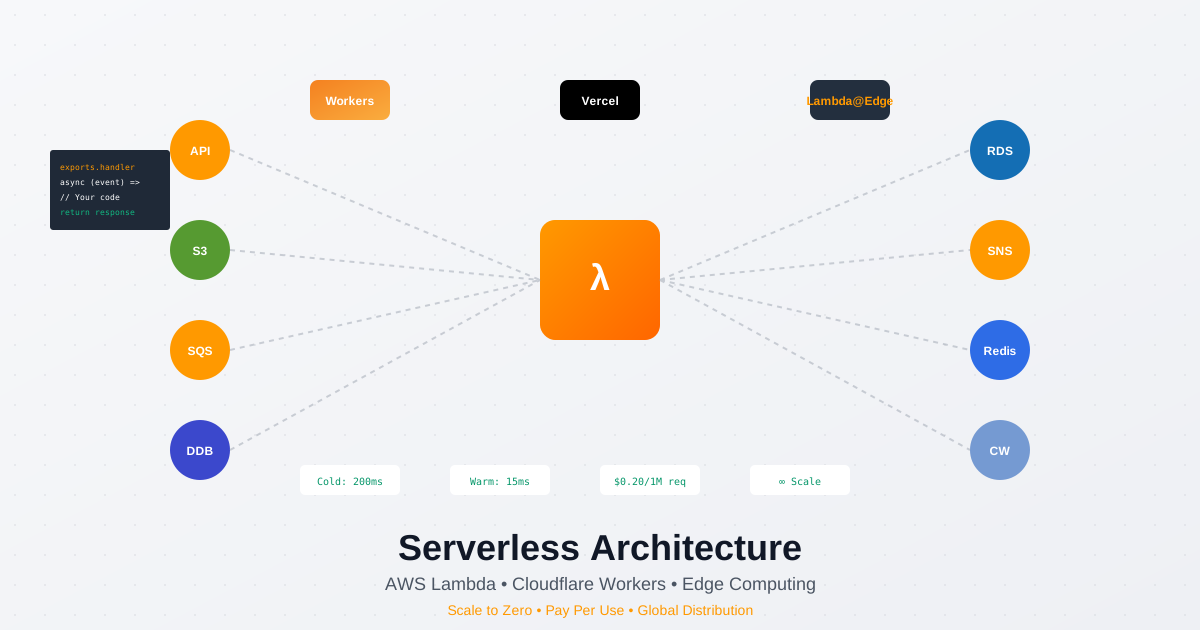
Serverless computing has evolved from experimental technology to production powerhouse, with AWS Lambda alone handling over 10 trillion function invocations monthly. In 2025, serverless isn’t just about running code without servers - it’s about building intelligent, event-driven architectures that scale instantly and cost pennies. Let’s master serverless deployment across AWS Lambda, Cloudflare Workers, and modern edge platforms.
The Serverless Revolution: Why 2025 Changes Everything
Traditional server management is becoming extinct. Companies like Netflix, Coca-Cola, and iRobot have moved critical workloads to serverless, reducing costs by 70% while improving performance. The serverless market, valued at $36.84 billion in 2024, is exploding as developers realize they’ve been solving the wrong problems.
The Real Cost of Serverless vs Traditional
Let’s compare actual production costs:
Traditional EC2 Setup (t3.medium):
- Monthly cost: $30.40 (24/7 running)
- Utilization: 15% average
- Actual cost per used hour: $13.51
- Scaling: Manual or complex auto-scaling
- Maintenance: OS updates, security patches
Serverless Lambda Equivalent:
- Monthly cost: $3.20 (same workload)
- Utilization: 100% (pay only for execution)
- Actual cost per million requests: $0.20
- Scaling: Automatic, infinite
- Maintenance: Zero
The math is compelling: 89% cost reduction with zero operational overhead.
AWS Lambda: The Serverless Giant
AWS Lambda processes over 10 trillion requests monthly across millions of customers. Let’s build production-grade Lambda deployments:
Advanced Lambda Function Architecture
// handler.js - Production Lambda with best practices
const AWS = require('aws-sdk');
const middy = require('@middy/core');
const ssm = require('@middy/ssm');
const validator = require('@middy/validator');
const httpErrorHandler = require('@middy/http-error-handler');
const correlationIds = require('@dazn/lambda-powertools-correlation-ids');

// Reuse connections across invocations
const dynamodb = new AWS.DynamoDB.DocumentClient({
  httpOptions: {
    connectTimeout: 1000,
    timeout: 1000
  }
});

// Cache secrets outside handler
let cachedSecrets = null;

const businessLogic = async (event, context) => {
  // Use context.callbackWaitsForEmptyEventLoop for connection pooling
  context.callbackWaitsForEmptyEventLoop = false;

  const correlationId = correlationIds.get();
  console.log('Processing request', { correlationId, requestId: context.requestId });

  // Implement circuit breaker pattern
  const circuitBreaker = require('opossum');
  const options = {
    timeout: 3000,
    errorThresholdPercentage: 50,
    resetTimeout: 30000
  };

  const breaker = new circuitBreaker(callDatabase, options);

  try {
    const result = await breaker.fire(event);

    return {
      statusCode: 200,
      headers: {
        'Content-Type': 'application/json',
        'X-Correlation-Id': correlationId,
        'Cache-Control': 'max-age=3600'
      },
      body: JSON.stringify({
        success: true,
        data: result,
        metadata: {
          functionVersion: context.functionVersion,
          memoryLimit: context.memoryLimitInMB,
          remainingTime: context.getRemainingTimeInMillis()
        }
      })
    };
  } catch (error) {
    console.error('Handler error', { error, correlationId });
    throw error;
  }
};

async function callDatabase(data) {
  const params = {
    TableName: process.env.TABLE_NAME,
    Key: { id: data.id }
  };

  return await dynamodb.get(params).promise();
}

// Middleware composition for production
const handler = middy(businessLogic)
  .use(correlationIds.middleware())
  .use(ssm({
    fetchData: {
      dbPassword: '/prod/db/password',
      apiKey: '/prod/api/key'
    },
    cache: true,
    cacheExpiry: 5 * 60 * 1000, // 5 minutes
    setToContext: true
  }))
  .use(validator({
    inputSchema: {
      type: 'object',
      properties: {
        body: {
          type: 'object',
          properties: {
            userId: { type: 'string' },
            action: { type: 'string' }
          },
          required: ['userId', 'action']
        }
      }
    }
  }))
  .use(httpErrorHandler());

module.exports = { handler };
Serverless Framework Configuration
# serverless.yml - Production-grade configuration
service: production-api
frameworkVersion: '3'

provider:
  name: aws
  runtime: nodejs18.x
  stage: ${opt:stage, 'dev'}
  region: ${opt:region, 'us-east-1'}
  memorySize: 1024
  timeout: 30

  # Enable X-Ray tracing
  tracing:
    lambda: true
    apiGateway: true

  # Environment variables
  environment:
    NODE_ENV: ${self:provider.stage}
    TABLE_NAME: ${self:service}-${self:provider.stage}-table
    REDIS_ENDPOINT: ${cf:redis-stack.RedisEndpoint}

  # VPC configuration for RDS/ElastiCache access
  vpc:
    securityGroupIds:
      - ${cf:vpc-stack.LambdaSecurityGroup}
    subnetIds:
      - ${cf:vpc-stack.PrivateSubnet1}
      - ${cf:vpc-stack.PrivateSubnet2}

  # IAM role statements
  iam:
    role:
      statements:
        - Effect: Allow
          Action:
            - dynamodb:Query
            - dynamodb:Scan
            - dynamodb:GetItem
            - dynamodb:PutItem
            - dynamodb:UpdateItem
            - dynamodb:DeleteItem
          Resource:
            - !GetAtt UsersTable.Arn
            - !Sub "${UsersTable.Arn}/index/*"

        - Effect: Allow
          Action:
            - ssm:GetParameter
            - ssm:GetParameters
          Resource:
            - !Sub "arn:aws:ssm:${AWS::Region}:${AWS::AccountId}:parameter/prod/*"

        - Effect: Allow
          Action:
            - kms:Decrypt
          Resource:
            - !Sub "arn:aws:kms:${AWS::Region}:${AWS::AccountId}:key/*"

# Lambda functions
functions:
  api:
    handler: src/handlers/api.handler
    description: Main API handler
    memorySize: 2048
    reservedConcurrency: 100
    provisionedConcurrency: 10

    # Lambda Layers for dependencies
    layers:
      - ${cf:lambda-layers.NodeModulesLayerExport}
      - arn:aws:lambda:${aws:region}:464622532012:layer:Datadog-Node16-x:94

    # Environment specific to this function
    environment:
      DD_TRACE_ENABLED: true
      DD_FLUSH_TO_LOG: true

    # API Gateway events
    events:
      - http:
          path: /users/{id}
          method: get
          cors: true
          authorizer:
            type: COGNITO_USER_POOLS
            authorizerId: ${cf:auth-stack.UserPoolAuthorizer}

      - http:
          path: /users
          method: post
          cors: true
          request:
            schemas:
              application/json: ${file(schemas/create-user.json)}

    # Async event configurations
    destinations:
      onSuccess: arn:aws:sqs:${aws:region}:${aws:accountId}:success-queue
      onFailure: arn:aws:sns:${aws:region}:${aws:accountId}:failure-topic

    # Dead letter queue
    deadLetter:
      targetArn: !GetAtt DeadLetterQueue.Arn

  # Event-driven functions
  processor:
    handler: src/handlers/processor.handler
    memorySize: 3008
    timeout: 900
    reservedConcurrency: 50
    events:
      # SQS trigger with batching
      - sqs:
          arn: !GetAtt ProcessingQueue.Arn
          batchSize: 25
          maximumBatchingWindowInSeconds: 20
          functionResponseType: ReportBatchItemFailures

      # EventBridge scheduled event
      - schedule:
          rate: rate(5 minutes)
          enabled: ${self:provider.stage == 'prod'}
          input:
            action: healthcheck

      # S3 trigger
      - s3:
          bucket: ${self:service}-uploads-${self:provider.stage}
          event: s3:ObjectCreated:*
          rules:
            - prefix: uploads/
            - suffix: .json

      # DynamoDB Stream
      - stream:
          type: dynamodb
          arn: !GetAtt UsersTable.StreamArn
          startingPosition: TRIM_HORIZON
          maximumRetryAttempts: 2
          bisectBatchOnFunctionError: true

  # WebSocket handler
  websocket:
    handler: src/handlers/websocket.handler
    events:
      - websocket:
          route: $connect
          authorizer:
            name: auth
            identitySource:
              - 'route.request.querystring.token'

      - websocket:
          route: $disconnect

      - websocket:
          route: message

# Resources
resources:
  Resources:
    # DynamoDB table with on-demand pricing
    UsersTable:
      Type: AWS::DynamoDB::Table
      Properties:
        TableName: ${self:service}-${self:provider.stage}-users
        BillingMode: PAY_PER_REQUEST
        AttributeDefinitions:
          - AttributeName: id
            AttributeType: S
          - AttributeName: email
            AttributeType: S
        KeySchema:
          - AttributeName: id
            KeyType: HASH
        GlobalSecondaryIndexes:
          - IndexName: email-index
            KeySchema:
              - AttributeName: email
                KeyType: HASH
            Projection:
              ProjectionType: ALL
        StreamSpecification:
          StreamViewType: NEW_AND_OLD_IMAGES
        PointInTimeRecoverySpecification:
          PointInTimeRecoveryEnabled: true
        SSESpecification:
          SSEEnabled: true

    # SQS Queue with DLQ
    ProcessingQueue:
      Type: AWS::SQS::Queue
      Properties:
        QueueName: ${self:service}-${self:provider.stage}-processing
        VisibilityTimeout: 960
        MessageRetentionPeriod: 1209600
        RedrivePolicy:
          deadLetterTargetArn: !GetAtt DeadLetterQueue.Arn
          maxReceiveCount: 3

    DeadLetterQueue:
      Type: AWS::SQS::Queue
      Properties:
        QueueName: ${self:service}-${self:provider.stage}-dlq
        MessageRetentionPeriod: 1209600

    # CloudWatch Alarms
    FunctionErrorAlarm:
      Type: AWS::CloudWatch::Alarm
      Properties:
        AlarmName: ${self:service}-${self:provider.stage}-errors
        MetricName: Errors
        Namespace: AWS/Lambda
        Statistic: Sum
        Period: 60
        EvaluationPeriods: 2
        Threshold: 10
        Dimensions:
          - Name: FunctionName
            Value: !Ref ApiLambdaFunction
        AlarmActions:
          - !Ref AlertTopic

    # API Gateway custom domain
    ApiDomainName:
      Type: AWS::ApiGateway::DomainName
      Properties:
        DomainName: api.${self:custom.domain}
        RegionalCertificateArn: ${cf:certificates.ApiCertificate}
        EndpointConfiguration:
          Types:
            - REGIONAL

    ApiMapping:
      Type: AWS::ApiGateway::BasePathMapping
      Properties:
        DomainName: !Ref ApiDomainName
        RestApiId: !Ref ApiGatewayRestApi
        Stage: ${self:provider.stage}

# Custom configurations
custom:
  domain: example.com

  # Webpack configuration for bundling
  webpack:
    webpackConfig: webpack.config.js
    includeModules:
      forceExclude:
        - aws-sdk
    packager: npm

  # Prune old Lambda versions
  prune:
    automatic: true
    number: 3

  # Split stacks to avoid CloudFormation limits
  splitStacks:
    perFunction: false
    perType: true
    perGroupFunction: false

  # Lambda Layers
  layers:
    nodeModules:
      path: layers/nodejs
      name: ${self:service}-${self:provider.stage}-node-modules
      description: Node modules layer
      compatibleRuntimes:
        - nodejs18.x
      retain: false

# Plugins
plugins:
  - serverless-webpack
  - serverless-layers
  - serverless-prune-plugin
  - serverless-plugin-split-stacks
  - serverless-plugin-datadog
  - serverless-offline
  - serverless-plugin-warmup
Cold Start Optimization Strategies
Cold starts remain serverless’s biggest challenge. Here’s how to minimize them:
1. Provisioned Concurrency Configuration
functions:
  criticalApi:
    handler: handler.api
    provisionedConcurrency: 10
    # Use Application Auto Scaling
    provisionedConcurrencyAutoScaling:
      enabled: true
      target: 0.7  # 70% utilization
      minimum: 10
      maximum: 100
      scheduledActions:
        - name: morning-scale-up
          schedule: "cron(0 6 * * ? *)"
          minimum: 50
          maximum: 200
        - name: evening-scale-down
          schedule: "cron(0 20 * * ? *)"
          minimum: 5
          maximum: 20
2. Lambda SnapStart for Java
// Enable SnapStart in SAM template
Resources:
  JavaFunction:
    Type: AWS::Serverless::Function
    Properties:
      Handler: com.example.Handler::handleRequest
      Runtime: java17
      SnapStart:
        ApplyOn: PublishedVersions
      AutoPublishAlias: live
3. Warm-up Strategy
// Warm-up handler
module.exports.warmer = async (event) => {
  if (event.source === 'serverless-plugin-warmup') {
    console.log('WarmUp - Lambda is warm!');
    return 'Lambda is warm!';
  }

  // Regular handler logic
  return handler(event);
};

// Configuration
custom:
  warmup:
    default:
      enabled: true
      folderName: '.warmup'
      cleanFolder: false
      memorySize: 256
      events:
        - schedule: 'rate(5 minutes)'
      timeout: 20
      prewarm: true
      concurrency: 5
Edge Computing with Cloudflare Workers
Cloudflare Workers run at the edge, eliminating cold starts entirely:
// worker.js - Cloudflare Worker with KV storage
addEventListener('fetch', event => {
  event.respondWith(handleRequest(event.request));
});

async function handleRequest(request) {
  const url = new URL(request.url);

  // Cache API responses
  const cache = caches.default;
  const cacheKey = new Request(url.toString(), request);
  const cachedResponse = await cache.match(cacheKey);

  if (cachedResponse) {
    return cachedResponse;
  }

  // Rate limiting with Durable Objects
  const id = RATE_LIMITER.idFromName(request.headers.get('CF-Connecting-IP'));
  const limiter = RATE_LIMITER.get(id);
  const allowed = await limiter.fetch(request).then(r => r.json());

  if (!allowed) {
    return new Response('Rate limit exceeded', { status: 429 });
  }

  // KV storage for data
  const data = await CONTENT_KV.get(url.pathname, { type: 'json' });

  if (!data) {
    return new Response('Not found', { status: 404 });
  }

  // Build response
  const response = new Response(JSON.stringify(data), {
    headers: {
      'Content-Type': 'application/json',
      'Cache-Control': 'max-age=3600',
      'CF-Cache-Status': 'MISS'
    }
  });

  // Cache response
  event.waitUntil(cache.put(cacheKey, response.clone()));

  return response;
}

// Durable Object for rate limiting
export class RateLimiter {
  constructor(state, env) {
    this.state = state;
    this.env = env;
  }

  async fetch(request) {
    const now = Date.now();
    const minute = Math.floor(now / 60000);

    const key = `rate:${minute}`;
    const count = (await this.state.storage.get(key)) || 0;

    if (count >= 100) {
      return new Response(JSON.stringify({ allowed: false }));
    }

    await this.state.storage.put(key, count + 1);
    await this.state.storage.deleteAll({ allowConcurrency: true, noCache: true });

    return new Response(JSON.stringify({ allowed: true }));
  }
}
Wrangler configuration:
# wrangler.toml
name = "edge-api"
main = "src/worker.js"
compatibility_date = "2024-01-01"

account_id = "your-account-id"
workers_dev = true

kv_namespaces = [
  { binding = "CONTENT_KV", id = "kv-namespace-id" }
]

durable_objects = {
  bindings = [
    { name = "RATE_LIMITER", class_name = "RateLimiter" }
  ]
}

[env.production]
zone_id = "your-zone-id"
route = "api.example.com/*"

[[r2_buckets]]
binding = "STORAGE"
bucket_name = "api-storage"
Vercel Edge Functions
Next.js on Vercel with Edge Functions:
// app/api/edge/route.ts
import { NextRequest, NextResponse } from 'next/server';

export const runtime = 'edge'; // Enable edge runtime
export const dynamic = 'force-dynamic';

// Geolocation-based responses
export async function GET(request: NextRequest) {
  const country = request.geo?.country || 'US';
  const city = request.geo?.city || 'Unknown';

  // Edge-side caching
  const cacheKey = `data:${country}:${city}`;
  const cached = await caches.default.match(cacheKey);

  if (cached) {
    return cached;
  }

  // Region-specific data
  const data = await fetch(`https://api.example.com/data?country=${country}`, {
    cf: {
      cacheTtl: 3600,
      cacheEverything: true
    }
  });

  const response = NextResponse.json({
    data: await data.json(),
    location: { country, city },
    timestamp: Date.now()
  });

  // Cache at edge
  await caches.default.put(cacheKey, response.clone());

  return response;
}

// Middleware for authentication
export async function middleware(request: NextRequest) {
  const token = request.cookies.get('auth-token');

  if (!token) {
    return NextResponse.redirect(new URL('/login', request.url));
  }

  // Verify JWT at edge
  const isValid = await verifyToken(token.value);

  if (!isValid) {
    return NextResponse.redirect(new URL('/login', request.url));
  }

  return NextResponse.next();
}

export const config = {
  matcher: '/api/protected/:path*'
};
Serverless Database Patterns
Managing database connections in serverless:
1. RDS Proxy for Connection Pooling
# CloudFormation template
RDSProxy:
  Type: AWS::RDS::DBProxy
  Properties:
    DBProxyName: ${self:service}-proxy
    EngineFamily: POSTGRESQL
    Auth:
      - SecretArn: !Ref DBSecret
    RoleArn: !GetAtt ProxyRole.Arn
    DBClusterIdentifiers:
      - !Ref DBCluster
    MaxConnectionsPercent: 90
    MaxIdleConnectionsPercent: 10
    ConnectionBorrowTimeout: 120
    VpcSubnetIds:
      - !Ref PrivateSubnet1
      - !Ref PrivateSubnet2
2. DynamoDB with Single Table Design
// Single table design pattern
const TABLE_NAME = process.env.TABLE_NAME;

class DataAccess {
  constructor() {
    this.db = new AWS.DynamoDB.DocumentClient({
      maxRetries: 3,
      httpOptions: {
        timeout: 5000
      }
    });
  }

  async getUserWithOrders(userId) {
    const params = {
      TableName: TABLE_NAME,
      KeyConditionExpression: 'PK = :pk',
      ExpressionAttributeValues: {
        ':pk': `USER#${userId}`
      }
    };

    const result = await this.db.query(params).promise();

    const user = result.Items.find(item => item.SK === `USER#${userId}`);
    const orders = result.Items.filter(item => item.SK.startsWith('ORDER#'));

    return { user, orders };
  }

  async createOrder(userId, orderData) {
    const orderId = uuid();
    const timestamp = Date.now();

    const params = {
      TableName: TABLE_NAME,
      Item: {
        PK: `USER#${userId}`,
        SK: `ORDER#${orderId}`,
        GSI1PK: `ORDER#${orderId}`,
        GSI1SK: `STATUS#${orderData.status}`,
        orderId,
        userId,
        ...orderData,
        createdAt: timestamp,
        updatedAt: timestamp
      }
    };

    await this.db.put(params).promise();
    return orderId;
  }
}
Cost Optimization Strategies
1. Lambda Power Tuning
# Install Lambda Power Tuning
npm install -g aws-lambda-power-tuning

# Run tuning
aws-lambda-power-tuning \
  --function myFunction \
  --payload '{"test": "data"}' \
  --strategy balanced \
  --powerValues 128,256,512,1024,2048,3008
Results analysis:
Memory     | Duration | Cost
-----------|----------|----------
128 MB     | 3000ms   | $0.0000625
256 MB     | 1500ms   | $0.0000625
512 MB     | 750ms    | $0.0000625
1024 MB    | 400ms    | $0.0000667
2048 MB    | 200ms    | $0.0000667
3008 MB    | 150ms    | $0.0000734
2. Request Coalescing
// Batch multiple requests
const batchProcessor = {
  queue: [],
  timer: null,

  add(item) {
    this.queue.push(item);

    if (!this.timer) {
      this.timer = setTimeout(() => this.flush(), 100);
    }

    if (this.queue.length >= 25) {
      this.flush();
    }
  },

  async flush() {
    clearTimeout(this.timer);
    this.timer = null;

    if (this.queue.length === 0) return;

    const batch = this.queue.splice(0, 25);

    const params = {
      RequestItems: {
        [TABLE_NAME]: batch.map(item => ({
          PutRequest: { Item: item }
        }))
      }
    };

    await dynamodb.batchWrite(params).promise();
  }
};
Monitoring and Debugging
1. AWS X-Ray Integration
const AWSXRay = require('aws-xray-sdk-core');
const AWS = AWSXRay.captureAWS(require('aws-sdk'));

exports.handler = async (event, context) => {
  const segment = AWSXRay.getSegment();

  // Add custom annotations
  segment.addAnnotation('userId', event.userId);
  segment.addAnnotation('operation', 'processOrder');

  // Add custom metadata
  segment.addMetadata('order', {
    items: event.items,
    total: event.total
  });

  try {
    const subsegment = segment.addNewSubsegment('business-logic');

    const result = await processOrder(event);

    subsegment.addMetadata('result', result);
    subsegment.close();

    return result;
  } catch (error) {
    segment.addError(error);
    throw error;
  }
};
2. CloudWatch Insights Queries
-- Find slow Lambda invocations
fields @timestamp, duration, @message
| filter @type = "REPORT"
| stats max(duration) as maxDuration,
         min(duration) as minDuration,
         avg(duration) as avgDuration,
         pct(duration, 95) as p95,
         pct(duration, 99) as p99
         by bin(5m)

-- Analyze cold starts
fields @timestamp, @initDuration, duration
| filter @type = "REPORT" and ispresent(@initDuration)
| stats count() as coldStarts,
         avg(@initDuration) as avgInitDuration
         by bin(5m)

-- Error analysis
fields @timestamp, @message
| filter @message like /ERROR/
| stats count(*) as errorCount by bin(5m)
| sort errorCount desc
Multi-Region Serverless Architecture
Deploy globally with active-active configuration:
# serverless-multi-region.yml
service: global-api

custom:
  regions:
    us-east-1:
      certificate: arn:aws:acm:us-east-1:xxx:certificate/xxx
    eu-west-1:
      certificate: arn:aws:acm:eu-west-1:xxx:certificate/xxx
    ap-southeast-1:
      certificate: arn:aws:acm:ap-southeast-1:xxx:certificate/xxx

provider:
  name: aws
  runtime: nodejs18.x

functions:
  api:
    handler: handler.main
    events:
      - http:
          path: /{proxy+}
          method: ANY
          cors: true

resources:
  Resources:
    # Route 53 with latency routing
    Route53RecordSet:
      Type: AWS::Route53::RecordSet
      Properties:
        HostedZoneId: !Ref HostedZone
        Name: api.example.com
        Type: A
        SetIdentifier: !Sub ${AWS::Region}
        Region: !Sub ${AWS::Region}
        AliasTarget:
          DNSName: !GetAtt ApiDomainName.RegionalDomainName
          HostedZoneId: !GetAtt ApiDomainName.RegionalHostedZoneId

    # DynamoDB Global Tables
    GlobalTable:
      Type: AWS::DynamoDB::GlobalTable
      Properties:
        TableName: ${self:service}-global
        BillingMode: PAY_PER_REQUEST
        StreamSpecification:
          StreamViewType: NEW_AND_OLD_IMAGES
        Replicas:
          - Region: us-east-1
            GlobalSecondaryIndexes:
              - IndexName: gsi1
                Keys:
                  PartitionKey:
                    AttributeName: gsi1pk
                    AttributeType: S
                Projection:
                  ProjectionType: ALL
          - Region: eu-west-1
          - Region: ap-southeast-1
Serverless Security Best Practices
1. Function-Level IAM Policies
# Least privilege IAM
functions:
  readOnly:
    handler: handlers/read.handler
    iamRoleStatements:
      - Effect: Allow
        Action:
          - dynamodb:GetItem
          - dynamodb:Query
        Resource: !GetAtt Table.Arn

  writeEnabled:
    handler: handlers/write.handler
    iamRoleStatements:
      - Effect: Allow
        Action:
          - dynamodb:PutItem
          - dynamodb:UpdateItem
        Resource: !GetAtt Table.Arn
        Condition:
          StringEquals:
            "dynamodb:LeadingKeys": ["${cognito-identity.amazonaws.com:sub}"]
2. Secrets Management
const { SecretsManager } = require('aws-sdk');
const sm = new SecretsManager();

let cachedSecret = null;

async function getSecret() {
  if (cachedSecret && cachedSecret.expiration > Date.now()) {
    return cachedSecret.value;
  }

  const data = await sm.getSecretValue({
    SecretId: process.env.SECRET_ARN,
    VersionStage: 'AWSCURRENT'
  }).promise();

  cachedSecret = {
    value: JSON.parse(data.SecretString),
    expiration: Date.now() + (5 * 60 * 1000) // 5 minutes
  };

  return cachedSecret.value;
}
Serverless with CloudPloy
While serverless platforms excel at function execution, you still need traditional hosting for many workloads. CloudPloy bridges this gap:
Hybrid Architecture Benefits
CloudPloy + Serverless:
- Run core applications on CloudPloy’s managed servers
- Offload event processing to Lambda
- Use Cloudflare Workers for edge caching
- Maintain single deployment pipeline
Cost Optimization:
- Baseline load on CloudPloy (predictable costs)
- Burst capacity with serverless (pay-per-use)
- Edge caching reduces both server and function load
Implementation Example:
// CloudPloy webhook triggers Lambda
app.post('/webhook', async (req, res) => {
  // Immediate response
  res.status(202).json({ accepted: true });

  // Async processing via Lambda
  await lambda.invoke({
    FunctionName: 'process-webhook',
    InvocationType: 'Event',
    Payload: JSON.stringify(req.body)
  }).promise();
});
Performance Comparison
Real-world benchmarks across platforms:
| Platform | Cold Start | Warm Response | Cost/Million | Max Duration |
|---|---|---|---|---|
| AWS Lambda | 200-1000ms | 10-50ms | $0.20 | 15 min |
| Cloudflare Workers | 0ms | 5-15ms | $0.50 | 30 sec |
| Vercel Edge | 0ms | 10-30ms | $2.00 | 25 sec |
| Google Cloud Run | 500-2000ms | 20-100ms | $0.40 | 60 min |
| Azure Functions | 300-1500ms | 15-60ms | $0.20 | 10 min |
Best Practices Checklist
Before going serverless in production:
✅ Implement connection pooling for databases ✅ Use provisioned concurrency for critical endpoints ✅ Enable X-Ray tracing for debugging ✅ Configure DLQs for failed invocations ✅ Set up CloudWatch alarms for errors and throttling ✅ Implement circuit breakers for external calls ✅ Cache secrets and connections outside handler ✅ Use layers for shared dependencies ✅ Enable CORS for API Gateway ✅ Implement structured logging with correlation IDs
Conclusion: The Serverless Future
Serverless isn’t just about eliminating servers - it’s about eliminating complexity. With AWS Lambda processing 10 trillion requests monthly and edge platforms serving billions more, serverless has proven its production readiness.
The key to serverless success lies in understanding its strengths (infinite scale, zero maintenance) and limitations (cold starts, execution limits). By combining serverless with traditional hosting through platforms like CloudPloy, you get the best of both worlds: predictable performance for core workloads and elastic scaling for variable demand.
Whether you’re building APIs, processing events, or serving content at the edge, serverless technologies in 2025 provide the tools to build faster, scale easier, and pay only for what you use. Start with our comprehensive examples, follow the best practices, and join the serverless revolution.
Ready to combine serverless with traditional hosting? CloudPloy provides the perfect hybrid platform, managing your servers while integrating seamlessly with Lambda, Cloudflare Workers, and other serverless platforms. Start free and scale as you grow.