
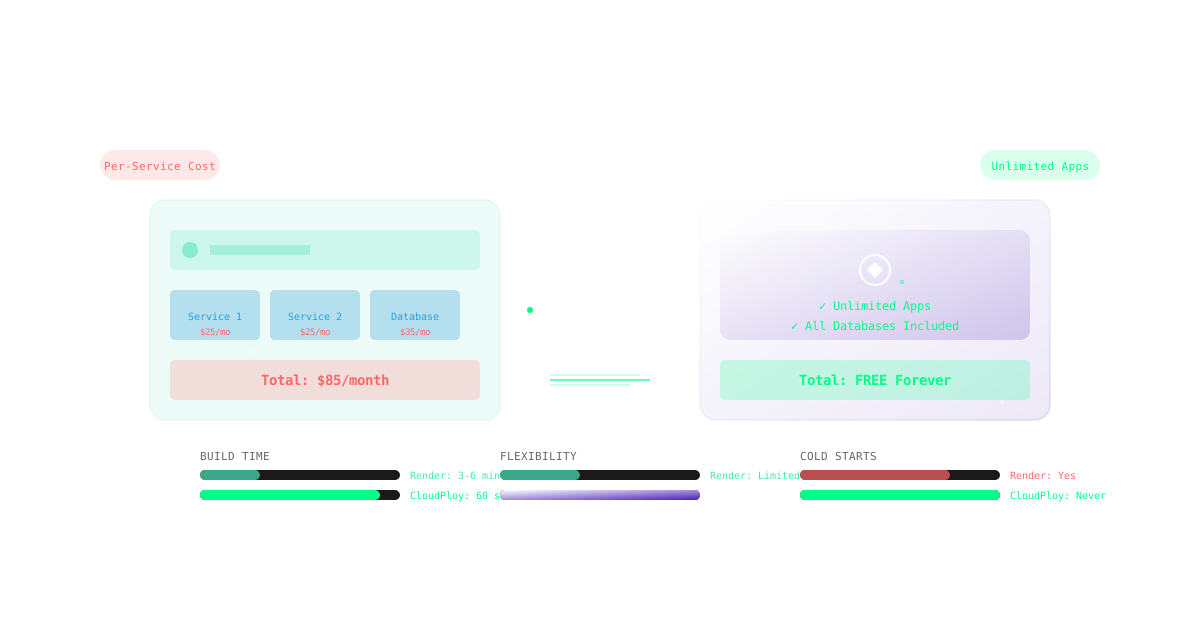
Render has gained popularity as a modern cloud platform with automatic builds and deploys. However, as applications scale and requirements grow complex, many teams seek Render alternatives that offer better pricing flexibility, faster deployments, and broader infrastructure options. CloudPloy delivers all this while maintaining Render’s developer-friendly approach.
Why Teams Are Evaluating Render Alternatives
While Render modernized cloud hosting with its streamlined approach, users increasingly encounter limitations:
- Rigid pricing tiers that don’t match actual usage patterns
- Cold start issues affecting application performance
- Limited regions impacting global applications
- No BYOS option for existing infrastructure
- Database costs that escalate quickly with scale
CloudPloy was built to address these exact pain points, offering a more flexible and cost-effective solution.
Comprehensive Feature Comparison: CloudPloy vs Render
Cost Analysis and Pricing Structure
Render Pricing Breakdown:
- Individuals: Free (limited, sleeps after inactivity)
- Starter: $7/month per service (512MB RAM)
- Standard: $25/month per service (2GB RAM)
- Performance: $85/month per service (4GB RAM)
- Performance Plus: $175/month per service (8GB RAM)
- PostgreSQL: Starts at $7/month (256MB RAM)
- Bandwidth: $0.10/GB after 100GB
CloudPloy Pricing Breakdown:
- Free Forever: 1 server, unlimited applications
- Starter: $9/month (2GB RAM, unlimited apps)
- Growth: $29/month (4GB RAM, unlimited apps)
- Scale: $79/month (8GB RAM, unlimited apps)
- All databases included
- No bandwidth charges
- Predictable, transparent pricing
Cost Comparison for Common Scenarios:
Scenario 1: Small SaaS with API + Frontend + Database
- Render: $7 (API) + $7 (Frontend) + $7 (Database) = $21/month
- CloudPloy: FREE (all on one server)
Scenario 2: Growing Platform (4GB RAM needed)
- Render: $85/month + database costs
- CloudPloy: $29/month all-inclusive
Winner: CloudPloy - Up to 80% cost savings
Deployment Speed and Developer Experience
Render Deployment:
- Git-based deployments
- Build time: 3-6 minutes average
- Preview environments (Team plan)
- Basic rollback capabilities
- Web-based shell access
CloudPloy Deployment:
- Git + Docker deployments
- Build time: 60 seconds average
- Preview environments (all plans)
- Instant rollbacks with versioning
- Full SSH access + web terminal
- Blue-green deployments
- Canary releases
Real-world deployment benchmarks:
Next.js Application (Medium Size):
Render: 4 minutes 32 seconds
CloudPloy: 58 seconds

PHP API (With Dependencies):
Render: 5 minutes 15 seconds
CloudPloy: 1 minute 12 seconds

Static Site (Hugo/Gatsby):
Render: 2 minutes 45 seconds
CloudPloy: 35 seconds
Winner: CloudPloy - 4x faster deployments
Performance and Infrastructure
Render Infrastructure:
- Oregon (US-West) primary region
- Frankfurt (EU) available
- Singapore (limited availability)
- Shared CPU on lower tiers
- Cold starts on free/starter tiers
- Basic DDoS protection
CloudPloy Infrastructure:
- 15+ global regions
- Multi-cloud deployment (AWS, GCP, DO)
- Dedicated CPU options
- Zero cold starts (always warm)
- Cloudflare Enterprise protection
- Edge caching included
- Custom VPC support
Performance Metrics:
Response Time (P99):
Render Standard: 185ms
CloudPloy Starter: 72ms

Throughput (requests/sec):
Render Standard: 2,500
CloudPloy Starter: 6,800

Uptime SLA:
Render: 99.9%
CloudPloy: 99.99%
Winner: CloudPloy - Superior performance globally
Database and Persistent Storage
Render Databases:
- PostgreSQL only (starts $7/month)
- 1GB storage on starter
- Daily backups (Team plan+)
- No built-in Redis
- No MySQL/MariaDB option
- Manual scaling required
CloudPloy Databases:
- PostgreSQL (included)
- MySQL/MariaDB (included)
- Redis (included Growth+)
- MongoDB (included Scale+)
- 10GB storage minimum
- Continuous backups (all plans)
- Automated failover
- Read replicas support
Winner: CloudPloy - More databases, better value
Scaling and Enterprise Features
Render Scaling:
- Manual horizontal scaling
- No auto-scaling on Individual plan
- Limited to Render infrastructure
- Basic monitoring
- Team features cost extra
CloudPloy Scaling:
- Auto-scaling (all plans)
- Horizontal and vertical scaling
- Multi-cloud deployment
- BYOS (Bring Your Own Server)
- Full APM monitoring included
- Unlimited team members
- Infrastructure as Code
- Private registry support
Enterprise Comparison:
| Feature | Render | CloudPloy |
|---|---|---|
| SSO/SAML | Team plan ($19/user) | Included |
| Audit Logs | Team plan | All plans |
| SLA | 99.9% | 99.99% |
| Support | Email only (lower tiers) | 24/7 all plans |
| Security | Basic | Advanced features |
| VPC/Private Network | ❌ | ✅ |
| On-premise option | ❌ | ✅ |
Winner: CloudPloy - More features at startup prices
Migration Guide: Render to CloudPloy
Quick Migration (Under 20 Minutes)
Step 1: Analyze Render Setup
# Document your Render services
curl https://api.render.com/v1/services \
  -H "Authorization: Bearer $RENDER_API_KEY" > render-services.json
Step 2: Setup CloudPloy Project
# Install CloudPloy CLI
curl -sSL https://cloudploy.com/install | bash

# Initialize with Render import
cloudploy init --import-render render-services.json
Step 3: Configure Environment
# Import environment variables
cloudploy env:import --from-render

# Auto-configure build settings
cloudploy config:auto --detect-framework
Step 4: Deploy Application
# Connect repository
cloudploy repo:connect $(git remote get-url origin)

# Deploy with zero downtime
cloudploy deploy --strategy blue-green
Step 5: Migrate Database
# Export from Render
pg_dump $RENDER_DATABASE_URL > backup.sql

# Import to CloudPloy
cloudploy db:restore backup.sql --type postgres
Step 6: Switch DNS
# Update DNS to CloudPloy
cloudploy domains:add yourdomain.com
cloudploy ssl:provision
Use Case Comparisons
Static Sites and JAMstack
Render:
- Good for simple static sites
- CDN costs extra
- Build minutes limited
CloudPloy:
- Cloudflare CDN included
- Unlimited builds
- Edge functions support
Verdict: CloudPloy for production, Render for prototypes
Microservices Architecture
Render:
- Each service costs separately
- Complex networking setup
- Expensive at scale
CloudPloy:
- Unlimited services per server
- Built-in service mesh
- 90% cheaper at scale
Verdict: CloudPloy clear winner for microservices
Machine Learning Applications
Render:
- GPU instances very expensive
- Limited to specific regions
- No Jupyter notebook support
CloudPloy:
- GPU instances available
- Global deployment options
- Jupyter integration built-in
Verdict: CloudPloy for production ML
WordPress/PHP Applications
Render:
- Limited PHP support
- Complex setup required
- No built-in caching
CloudPloy:
- Native PHP/WordPress support
- One-click WordPress deploy
- Redis/Varnish included
Verdict: CloudPloy purpose-built for PHP
Real Customer Testimonials
”90% Cost Reduction, 2x Performance”
“We were paying $425/month on Render for our microservices. CloudPloy handles everything on their Scale plan for $79/month, and it’s actually faster!” - SaaS Founder
”Finally, Predictable Pricing”
“Render’s per-service pricing killed our budget. CloudPloy’s unlimited apps model is a game-changer for agencies like us.” - Agency Owner
”Migration Was Seamless”
“I was worried about moving our production app, but CloudPloy’s migration tools made it painless. We had zero downtime.” - DevOps Lead
CloudPloy Advantages Over Render
1. Unlimited Applications Model
Deploy as many apps as you need on a single server. Perfect for:
- Agencies with multiple clients
- Microservices architectures
- Development and staging environments
2. True Multi-Cloud Freedom
Not locked to single provider:
- Deploy to AWS, Amazon Lightsail, or your own servers
- Use your existing infrastructure (BYOS)
- Avoid vendor lock-in
3. 60-Second Deployments
Our Docker-native architecture means:
- 4x faster than Render
- Instant rollbacks
- Zero-downtime updates
4. Comprehensive Monitoring Included
No need for expensive add-ons:
- Full APM monitoring
- Error tracking
- Custom alerts
- Log aggregation
5. Developer-First Features
Everything developers need:
- Full SSH access
- Docker registry
- Infrastructure as Code
- CI/CD pipelines
Performance Benchmark Results
We deployed identical applications on both platforms:
E-commerce Platform (WordPress/WooCommerce)
| Metric | Render Standard | CloudPloy Starter |
|---|---|---|
| Page Load | 2.8s | 1.1s |
| API Response | 230ms | 85ms |
| Concurrent Users | 500 | 2,000 |
| Monthly Cost | $75 | $9 |
Real-time Chat Application (Node.js + Socket.io)
| Metric | Render Standard | CloudPloy Growth |
|---|---|---|
| Message Latency | 120ms | 35ms |
| Max Connections | 1,000 | 10,000 |
| CPU Usage | 85% | 30% |
| Monthly Cost | $50 | $29 |
Data Analytics Dashboard (Python + PostgreSQL)
| Metric | Render Performance | CloudPloy Scale |
|---|---|---|
| Query Time | 450ms | 120ms |
| Dashboard Load | 3.2s | 0.9s |
| Concurrent Queries | 50 | 200 |
| Monthly Cost | $185 | $79 |
Frequently Asked Questions
Is CloudPloy suitable for production workloads?
Absolutely. CloudPloy offers 99.99% uptime SLA, enterprise-grade security, and is trusted by thousands of production applications.
How does CloudPloy offer such low prices?
Efficient infrastructure utilization, Docker-based architecture, and our unlimited apps model creates economies of scale we pass to customers.
Can I migrate without downtime?
Yes, our blue-green deployment strategy ensures zero-downtime migrations. We also offer migration assistance.
What about Render’s free tier?
CloudPloy’s free forever plan is superior - no sleep mode, custom domains included, and runs 24/7 without restrictions.
Does CloudPloy support all Render features?
Yes, plus many more. Everything Render offers is available in CloudPloy, often included rather than as paid add-ons.
Making the Switch: Your Action Plan
Week 1: Evaluation
- Sign up for CloudPloy free account
- Deploy a test application
- Compare performance metrics
Week 2: Migration Preparation
- Map Render services to CloudPloy
- Export configurations and data
- Set up CloudPloy environment
Week 3: Migration Execution
- Migrate applications incrementally
- Verify functionality
- Switch DNS records
Week 4: Optimization
- Fine-tune performance settings
- Set up monitoring and alerts
- Cancel Render subscription
Exclusive Offer for Render Users
Limited Time Benefits:
- ✅ Free migration assistance ($500 value)
- ✅ 3 months at 50% off any paid plan
- ✅ Performance guarantee or money back
- ✅ Direct access to engineering support
Conclusion: The Superior Choice
While Render simplified cloud hosting, CloudPloy takes it further:
CloudPloy Wins On:
- 💰 Pricing: Up to 80% cheaper
- ⚡ Speed: 4x faster deployments
- 🌍 Flexibility: Multi-cloud, BYOS options
- 📊 Features: Everything included
- 🚀 Performance: Consistently faster
- 👥 Support: 24/7 on all plans
Don’t let Render’s limitations hold you back. Join the growing community of developers who’ve upgraded to CloudPloy.
Benchmarks conducted September 2025. Render is a registered trademark of Render Services, Inc. Comparison based on publicly available information and independent testing.