
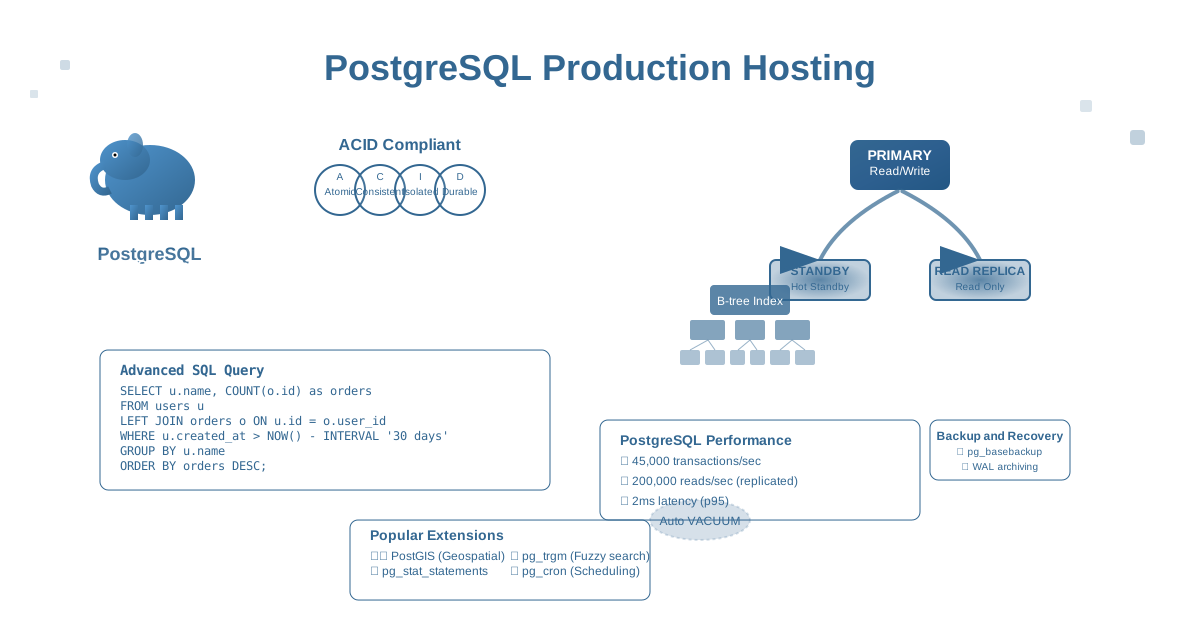
PostgreSQL powers over 40% of enterprise databases and is trusted by organizations like Apple, Netflix, Instagram, and Spotify to handle billions of transactions. Known as “the world’s most advanced open source database,” PostgreSQL combines the reliability of traditional RDBMS with modern features like JSON support, advanced indexing, and horizontal scaling. This comprehensive guide shows you how to deploy, optimize, and scale PostgreSQL for production in 2025.
Why PostgreSQL Leads Enterprise Databases
PostgreSQL has become the database of choice for modern applications because of its:
- ACID compliance: Full transactional integrity with advanced isolation levels
- Advanced data types: JSON, arrays, ranges, and custom types
- Powerful query planner: Sophisticated optimization for complex queries
- Extensibility: Custom functions, operators, and data types
- Concurrent performance: MVCC for high-concurrency workloads
- Standards compliance: Full SQL:2016 standard implementation
- Proven scalability: Handles petabyte-scale deployments
Production PostgreSQL Architecture
PostgreSQL Configuration Optimization
# postgresql.conf - Production-optimized configuration

#------------------------------------------------------------------------------
# CONNECTIONS AND AUTHENTICATION
#------------------------------------------------------------------------------
listen_addresses = '*'
port = 5432
max_connections = 200
superuser_reserved_connections = 3

# Connection pooling (use with pgbouncer)
# shared_preload_libraries = 'pg_stat_statements,auto_explain,pg_cron'

#------------------------------------------------------------------------------
# RESOURCE USAGE (except WAL)
#------------------------------------------------------------------------------
# Memory settings (adjust based on available RAM)
shared_buffers = 4GB                    # 25% of RAM
effective_cache_size = 12GB             # 75% of RAM
maintenance_work_mem = 512MB            # For VACUUM, CREATE INDEX
work_mem = 32MB                         # Per connection for sorts/hashes
max_worker_processes = 16
max_parallel_workers_per_gather = 4
max_parallel_workers = 16
max_parallel_maintenance_workers = 4

# Background writer
bgwriter_delay = 200ms
bgwriter_lru_maxpages = 100
bgwriter_lru_multiplier = 2.0
bgwriter_flush_after = 256kB

#------------------------------------------------------------------------------
# WRITE-AHEAD LOG
#------------------------------------------------------------------------------
wal_level = replica                     # For streaming replication
wal_buffers = 64MB                      # 3% of shared_buffers
wal_writer_delay = 200ms
wal_writer_flush_after = 1MB
wal_compression = on
wal_keep_size = 4GB

# Checkpoints
checkpoint_timeout = 15min
checkpoint_completion_target = 0.9
checkpoint_flush_after = 256kB
checkpoint_warning = 30s

# Archiving (for point-in-time recovery)
archive_mode = on
archive_command = '/opt/postgresql/scripts/archive_wal.sh %f %p'
archive_timeout = 300s

#------------------------------------------------------------------------------
# REPLICATION
#------------------------------------------------------------------------------
max_wal_senders = 10
hot_standby = on
hot_standby_feedback = on
wal_receiver_timeout = 60s
max_standby_streaming_delay = 30s

# Synchronous replication (optional)
synchronous_standby_names = 'standby1,standby2'
synchronous_commit = remote_apply

#------------------------------------------------------------------------------
# QUERY TUNING
#------------------------------------------------------------------------------
random_page_cost = 1.1                 # For SSD storage
seq_page_cost = 1.0
cpu_tuple_cost = 0.01
cpu_index_tuple_cost = 0.005
cpu_operator_cost = 0.0025
effective_io_concurrency = 200         # For SSD

# Query planning
default_statistics_target = 100
constraint_exclusion = partition
cursor_tuple_fraction = 0.1
from_collapse_limit = 8
join_collapse_limit = 8

#------------------------------------------------------------------------------
# LOGGING
#------------------------------------------------------------------------------
logging_collector = on
log_directory = 'log'
log_filename = 'postgresql-%Y-%m-%d_%H%M%S.log'
log_file_mode = 0600
log_rotation_age = 1d
log_rotation_size = 100MB
log_truncate_on_rotation = on

# What to log
log_min_duration_statement = 1000      # Log slow queries (1s+)
log_checkpoints = on
log_connections = off
log_disconnections = off
log_line_prefix = '%t [%p]: [%l-1] user=%u,db=%d,app=%a,client=%h '
log_lock_waits = on
log_temp_files = 10MB
log_autovacuum_min_duration = 0
log_statement = 'ddl'

# CSV logging for analysis
log_destination = 'csvlog,stderr'
log_statement_stats = off
log_parser_stats = off
log_planner_stats = off
log_executor_stats = off

#------------------------------------------------------------------------------
# RUNTIME STATISTICS
#------------------------------------------------------------------------------
track_activities = on
track_counts = on
track_io_timing = on
track_functions = all
stats_temp_directory = 'pg_stat_tmp'

# pg_stat_statements
pg_stat_statements.max = 10000
pg_stat_statements.track = all
pg_stat_statements.track_utility = on
pg_stat_statements.save = on

#------------------------------------------------------------------------------
# AUTOVACUUM
#------------------------------------------------------------------------------
autovacuum = on
autovacuum_max_workers = 6
autovacuum_naptime = 15s
autovacuum_vacuum_threshold = 50
autovacuum_vacuum_scale_factor = 0.1
autovacuum_analyze_threshold = 50
autovacuum_analyze_scale_factor = 0.05
autovacuum_vacuum_cost_delay = 10ms
autovacuum_vacuum_cost_limit = 1000

#------------------------------------------------------------------------------
# CLIENT CONNECTION DEFAULTS
#------------------------------------------------------------------------------
timezone = 'UTC'
datestyle = 'iso, mdy'
default_text_search_config = 'pg_catalog.english'
shared_preload_libraries = 'pg_stat_statements,auto_explain'

# Statement timeout (prevent runaway queries)
statement_timeout = 60s
lock_timeout = 30s
idle_in_transaction_session_timeout = 300s

#------------------------------------------------------------------------------
# SECURITY
#------------------------------------------------------------------------------
ssl = on
ssl_cert_file = '/opt/postgresql/certs/server.crt'
ssl_key_file = '/opt/postgresql/certs/server.key'
ssl_ca_file = '/opt/postgresql/certs/ca.crt'
ssl_ciphers = 'HIGH:MEDIUM:!aNULL:!MD5:!3DES'
ssl_prefer_server_ciphers = on
ssl_ecdh_curve = 'prime256v1'

# Password encryption
password_encryption = scram-sha-256

# Row Level Security
row_security = on
High Availability with Streaming Replication
#!/bin/bash
# setup-replication.sh - PostgreSQL streaming replication setup

set -euo pipefail

# Configuration variables
PRIMARY_HOST="pg-primary"
PRIMARY_PORT="5432"
STANDBY_HOST="pg-standby"
DATA_DIR="/var/lib/postgresql/14/main"
ARCHIVE_DIR="/var/lib/postgresql/archive"
REPLICATION_USER="replicator"
POSTGRES_USER="postgres"

log() {
    echo "[$(date '+%Y-%m-%d %H:%M:%S')] $1"
}

# Setup primary server
setup_primary() {
    log "Setting up primary server..."

    # Create replication user
    sudo -u postgres psql << EOF
CREATE USER ${REPLICATION_USER} WITH REPLICATION ENCRYPTED PASSWORD '$(openssl rand -base64 32)';
EOF

    # Create replication slot
    sudo -u postgres psql << EOF
SELECT pg_create_physical_replication_slot('standby_slot');
EOF

    # Configure pg_hba.conf for replication
    cat >> "${DATA_DIR}/pg_hba.conf" << EOF
# Replication connections
host replication ${REPLICATION_USER} ${STANDBY_HOST}/32 scram-sha-256
host replication ${REPLICATION_USER} 10.0.0.0/8 scram-sha-256
EOF

    # Create archive directory
    sudo mkdir -p "${ARCHIVE_DIR}"
    sudo chown postgres:postgres "${ARCHIVE_DIR}"
    sudo chmod 700 "${ARCHIVE_DIR}"

    # Create WAL archive script
    sudo tee /opt/postgresql/scripts/archive_wal.sh << 'EOF'
#!/bin/bash
WAL_FILE=$1
WAL_PATH=$2
ARCHIVE_DIR="/var/lib/postgresql/archive"
S3_BUCKET="${S3_BUCKET:-postgres-wal-archive}"

# Local archive first
cp "$WAL_PATH" "$ARCHIVE_DIR/$WAL_FILE"

# Archive to S3 (if configured)
if command -v aws >/dev/null 2>&1 && [ -n "$S3_BUCKET" ]; then
    aws s3 cp "$WAL_PATH" "s3://$S3_BUCKET/wal/$WAL_FILE" \
        --storage-class STANDARD_IA \
        --server-side-encryption AES256
fi

# Verify archive exists
if [ -f "$ARCHIVE_DIR/$WAL_FILE" ]; then
    exit 0
else
    exit 1
fi
EOF

    sudo chmod +x /opt/postgresql/scripts/archive_wal.sh
    sudo chown postgres:postgres /opt/postgresql/scripts/archive_wal.sh

    # Restart PostgreSQL
    sudo systemctl restart postgresql
    log "Primary server setup completed"
}

# Setup standby server
setup_standby() {
    log "Setting up standby server..."

    # Stop PostgreSQL
    sudo systemctl stop postgresql

    # Backup existing data directory
    sudo mv "${DATA_DIR}" "${DATA_DIR}.backup.$(date +%s)"

    # Create base backup from primary
    sudo -u postgres pg_basebackup \
        -h "${PRIMARY_HOST}" \
        -p "${PRIMARY_PORT}" \
        -U "${REPLICATION_USER}" \
        -D "${DATA_DIR}" \
        -W \
        -v \
        -P \
        -X stream \
        -R

    # Create standby.signal file
    sudo -u postgres touch "${DATA_DIR}/standby.signal"

    # Configure recovery settings
    sudo -u postgres tee "${DATA_DIR}/postgresql.auto.conf" << EOF
# Standby configuration
primary_conninfo = 'host=${PRIMARY_HOST} port=${PRIMARY_PORT} user=${REPLICATION_USER} application_name=standby1'
primary_slot_name = 'standby_slot'
restore_command = '/opt/postgresql/scripts/restore_wal.sh %f %p'
recovery_target_timeline = 'latest'
hot_standby = on
EOF

    # Create WAL restore script
    sudo tee /opt/postgresql/scripts/restore_wal.sh << 'EOF'
#!/bin/bash
WAL_FILE=$1
WAL_PATH=$2
ARCHIVE_DIR="/var/lib/postgresql/archive"
S3_BUCKET="${S3_BUCKET:-postgres-wal-archive}"

# Try local archive first
if [ -f "$ARCHIVE_DIR/$WAL_FILE" ]; then
    cp "$ARCHIVE_DIR/$WAL_FILE" "$WAL_PATH"
    exit 0
fi

# Try S3 archive
if command -v aws >/dev/null 2>&1 && [ -n "$S3_BUCKET" ]; then
    if aws s3 cp "s3://$S3_BUCKET/wal/$WAL_FILE" "$WAL_PATH"; then
        exit 0
    fi
fi

# WAL file not found
exit 1
EOF

    sudo chmod +x /opt/postgresql/scripts/restore_wal.sh
    sudo chown postgres:postgres /opt/postgresql/scripts/restore_wal.sh

    # Start PostgreSQL
    sudo systemctl start postgresql
    log "Standby server setup completed"
}

# Verify replication
verify_replication() {
    log "Verifying replication setup..."

    # Check replication status on primary
    primary_status=$(sudo -u postgres psql -h "${PRIMARY_HOST}" -c "
        SELECT client_addr, state, sync_state, replay_lag
        FROM pg_stat_replication;" -t)

    log "Primary replication status:"
    echo "$primary_status"

    # Check replication status on standby
    standby_status=$(sudo -u postgres psql -h "${STANDBY_HOST}" -c "
        SELECT pg_is_in_recovery(),
               pg_last_wal_receive_lsn(),
               pg_last_wal_replay_lsn(),
               pg_last_xact_replay_timestamp();" -t)

    log "Standby replication status:"
    echo "$standby_status"

    # Test replication with sample data
    log "Testing replication with sample data..."

    sudo -u postgres psql -h "${PRIMARY_HOST}" << EOF
CREATE TABLE IF NOT EXISTS replication_test (
    id SERIAL PRIMARY KEY,
    data TEXT,
    created_at TIMESTAMP DEFAULT NOW()
);

INSERT INTO replication_test (data) VALUES ('Test replication at $(date)');
EOF

    # Wait for replication
    sleep 5

    # Check data on standby
    standby_data=$(sudo -u postgres psql -h "${STANDBY_HOST}" -c "
        SELECT COUNT(*) FROM replication_test;" -t 2>/dev/null || echo "0")

    if [ "$standby_data" -gt "0" ]; then
        log "Replication test successful!"
    else
        log "ERROR: Replication test failed"
        exit 1
    fi
}

# Failover procedures
setup_failover() {
    log "Setting up failover procedures..."

    # Create failover script
    sudo tee /opt/postgresql/scripts/failover.sh << 'EOF'
#!/bin/bash
# PostgreSQL failover script

set -euo pipefail

STANDBY_HOST="${1:-pg-standby}"
DATA_DIR="/var/lib/postgresql/14/main"
POSTGRES_USER="postgres"

log() {
    echo "[$(date '+%Y-%m-%d %H:%M:%S')] $1"
}

promote_standby() {
    log "Promoting standby to primary..."

    # Stop PostgreSQL on standby
    sudo -u postgres pg_ctl stop -D "$DATA_DIR" -m fast

    # Remove standby.signal file
    sudo -u postgres rm -f "$DATA_DIR/standby.signal"

    # Promote standby
    sudo -u postgres pg_ctl promote -D "$DATA_DIR"

    # Update configuration for new primary
    sudo -u postgres psql << 'EOSQL'
-- Create replication slot for new standby
SELECT pg_create_physical_replication_slot('new_standby_slot');

-- Update archive command if needed
ALTER SYSTEM SET archive_command = '/opt/postgresql/scripts/archive_wal.sh %f %p';
SELECT pg_reload_conf();
EOSQL

    log "Standby promoted to primary successfully"
}

# Check if primary is down
check_primary_status() {
    if pg_isready -h "${PRIMARY_HOST}" -p 5432 -U postgres >/dev/null 2>&1; then
        return 0  # Primary is up
    else
        return 1  # Primary is down
    fi
}

# Main failover logic
main() {
    if ! check_primary_status; then
        log "Primary server is down, initiating failover..."
        promote_standby
    else
        log "Primary server is healthy, no failover needed"
        exit 0
    fi
}

main "$@"
EOF

    sudo chmod +x /opt/postgresql/scripts/failover.sh
    sudo chown postgres:postgres /opt/postgresql/scripts/failover.sh

    log "Failover procedures setup completed"
}

# Main execution
case "${1:-}" in
    "primary")
        setup_primary
        ;;
    "standby")
        setup_standby
        ;;
    "verify")
        verify_replication
        ;;
    "failover")
        setup_failover
        ;;
    *)
        echo "Usage: $0 {primary|standby|verify|failover}"
        echo "  primary - Setup primary server"
        echo "  standby - Setup standby server"
        echo "  verify  - Verify replication"
        echo "  failover - Setup failover procedures"
        exit 1
        ;;
esac
Connection Pooling with PgBouncer
PgBouncer Configuration
# pgbouncer.ini - Production PgBouncer configuration

[databases]
myapp_production = host=localhost port=5432 dbname=myapp_production user=myapp_user pool_size=25
myapp_readonly = host=pg-standby port=5432 dbname=myapp_production user=myapp_readonly pool_size=15
analytics = host=pg-standby port=5432 dbname=analytics user=analytics_user pool_size=10

[pgbouncer]
# Listen settings
listen_addr = 0.0.0.0
listen_port = 6432
unix_socket_dir = /var/run/postgresql
unix_socket_mode = 0777

# Authentication
auth_type = scram-sha-256
auth_file = /etc/pgbouncer/userlist.txt
auth_user = pgbouncer
auth_query = SELECT usename, passwd FROM pgbouncer.auth_user WHERE usename=$1

# Pool settings
pool_mode = transaction
default_pool_size = 20
min_pool_size = 5
reserve_pool_size = 5
reserve_pool_timeout = 3
max_client_conn = 1000
max_db_connections = 100
max_user_connections = 50

# Connection limits and timeouts
server_connect_timeout = 15
server_login_retry = 5
query_timeout = 300
query_wait_timeout = 120
client_idle_timeout = 3600
server_idle_timeout = 600
server_lifetime = 7200
server_reset_query = DISCARD ALL
server_reset_query_always = 0

# TLS settings
server_tls_sslmode = require
server_tls_ca_file = /opt/postgresql/certs/ca.crt
server_tls_cert_file = /opt/postgresql/certs/client.crt
server_tls_key_file = /opt/postgresql/certs/client.key
client_tls_sslmode = allow
client_tls_ca_file = /opt/postgresql/certs/ca.crt
client_tls_cert_file = /opt/postgresql/certs/server.crt
client_tls_key_file = /opt/postgresql/certs/server.key

# Logging
syslog = 1
syslog_facility = daemon
syslog_ident = pgbouncer
log_connections = 1
log_disconnections = 1
log_pooler_errors = 1
log_stats = 1
stats_period = 60

# Console access
admin_users = admin, postgres
stats_users = monitoring, admin

# Application name for connection tracking
application_name_add_host = 1

# DNS settings
dns_max_ttl = 15
dns_zone_check_period = 0

# Health check query
server_check_query = SELECT 1
server_check_delay = 30

# Miscellaneous
ignore_startup_parameters = extra_float_digits,search_path
disable_pqexec = 0
conffile = /etc/pgbouncer/pgbouncer.ini
pidfile = /var/run/pgbouncer/pgbouncer.pid
PgBouncer Management Scripts
#!/bin/bash
# pgbouncer-manage.sh - PgBouncer management and monitoring

set -euo pipefail

PGBOUNCER_CONFIG="/etc/pgbouncer/pgbouncer.ini"
PGBOUNCER_USERLIST="/etc/pgbouncer/userlist.txt"
PGBOUNCER_PID="/var/run/pgbouncer/pgbouncer.pid"
PGBOUNCER_SOCKET="/var/run/postgresql/.s.PGSQL.6432"

log() {
    echo "[$(date '+%Y-%m-%d %H:%M:%S')] $1"
}

# Generate user authentication file
generate_userlist() {
    log "Generating PgBouncer user list..."

    # Connect to PostgreSQL and extract users with passwords
    sudo -u postgres psql -t -c "
        SELECT '\"' || rolname || '\" \"' || rolpassword || '\"'
        FROM pg_roles
        WHERE rolcanlogin = true
          AND rolpassword IS NOT NULL
    " | grep -v '^$' > "$PGBOUNCER_USERLIST.tmp"

    # Add pgbouncer admin user
    echo '"pgbouncer" "$(openssl rand -base64 32 | tr -d '\n')"' >> "$PGBOUNCER_USERLIST.tmp"

    # Atomic move to avoid partial reads
    mv "$PGBOUNCER_USERLIST.tmp" "$PGBOUNCER_USERLIST"
    chown postgres:postgres "$PGBOUNCER_USERLIST"
    chmod 600 "$PGBOUNCER_USERLIST"

    log "User list updated successfully"
}

# Monitor PgBouncer statistics
monitor_stats() {
    log "PgBouncer Statistics:"
    echo "===================="

    # Connect to PgBouncer admin console
    psql -h localhost -p 6432 -U postgres pgbouncer << 'EOF'
SHOW POOLS;
\echo
SHOW DATABASES;
\echo
SHOW STATS;
\echo
SHOW CLIENTS;
\echo
SHOW SERVERS;
EOF
}

# Health check function
health_check() {
    local health_status="healthy"
    local issues=()

    # Check if PgBouncer is running
    if ! pgrep pgbouncer >/dev/null; then
        health_status="critical"
        issues+=("PgBouncer process not running")
    fi

    # Check socket availability
    if ! psql -h localhost -p 6432 -U postgres -c "SELECT 1" pgbouncer >/dev/null 2>&1; then
        health_status="critical"
        issues+=("Cannot connect to PgBouncer")
    fi

    # Check pool utilization
    local pool_stats
    pool_stats=$(psql -h localhost -p 6432 -U postgres -t -c "SHOW POOLS;" pgbouncer 2>/dev/null || echo "")

    if [ -n "$pool_stats" ]; then
        while IFS='|' read -r database user cl_active cl_waiting sv_active sv_idle sv_used sv_tested sv_login maxwait pool_mode; do
            # Remove whitespace
            cl_active=$(echo "$cl_active" | xargs)
            sv_active=$(echo "$sv_active" | xargs)
            sv_idle=$(echo "$sv_idle" | xargs)

            # Check for high utilization (>80%)
            if [ "$cl_active" -gt 0 ] && [ "$sv_active" -gt 0 ]; then
                local utilization=$((cl_active * 100 / (sv_active + sv_idle)))
                if [ "$utilization" -gt 80 ]; then
                    health_status="warning"
                    issues+=("High pool utilization in $database: ${utilization}%")
                fi
            fi
        done <<< "$pool_stats"
    fi

    # Output health status
    echo "Health Status: $health_status"
    if [ ${#issues[@]} -gt 0 ]; then
        echo "Issues found:"
        for issue in "${issues[@]}"; do
            echo "  - $issue"
        done
    fi

    # Return appropriate exit code
    case "$health_status" in
        "healthy") return 0 ;;
        "warning") return 1 ;;
        "critical") return 2 ;;
    esac
}

# Reload configuration
reload_config() {
    log "Reloading PgBouncer configuration..."

    # Test configuration first
    if pgbouncer -t "$PGBOUNCER_CONFIG"; then
        # Send SIGHUP to reload
        if [ -f "$PGBOUNCER_PID" ]; then
            kill -HUP "$(cat "$PGBOUNCER_PID")"
            log "Configuration reloaded successfully"
        else
            log "ERROR: PgBouncer PID file not found"
            return 1
        fi
    else
        log "ERROR: Configuration test failed"
        return 1
    fi
}

# Graceful restart
restart_graceful() {
    log "Performing graceful restart of PgBouncer..."

    # Pause all new connections
    psql -h localhost -p 6432 -U postgres -c "PAUSE;" pgbouncer

    # Wait for active connections to finish
    local timeout=60
    local elapsed=0

    while [ $elapsed -lt $timeout ]; do
        local active_connections
        active_connections=$(psql -h localhost -p 6432 -U postgres -t -c "
            SELECT COALESCE(SUM(cl_active), 0) FROM SHOW_POOLS() WHERE pool_mode != 'statement';
        " pgbouncer 2>/dev/null | xargs)

        if [ "$active_connections" -eq 0 ]; then
            break
        fi

        log "Waiting for $active_connections active connections to finish..."
        sleep 5
        elapsed=$((elapsed + 5))
    done

    # Resume and restart
    psql -h localhost -p 6432 -U postgres -c "RESUME;" pgbouncer
    systemctl restart pgbouncer

    log "Graceful restart completed"
}

# Connection pooling optimization
optimize_pools() {
    log "Analyzing and optimizing connection pools..."

    # Get database connection statistics
    local stats
    stats=$(psql -h localhost -p 6432 -U postgres -c "SHOW STATS;" pgbouncer)

    echo "$stats"

    # Recommendations based on stats
    log "Pool optimization recommendations:"

    # Check for connection queueing
    local queued_connections
    queued_connections=$(psql -h localhost -p 6432 -U postgres -t -c "
        SELECT COALESCE(SUM(cl_waiting), 0) FROM SHOW_POOLS();
    " pgbouncer | xargs)

    if [ "$queued_connections" -gt 0 ]; then
        echo "  - Consider increasing pool sizes (currently $queued_connections queued)"
    fi

    # Check for idle connections
    local idle_connections
    idle_connections=$(psql -h localhost -p 6432 -U postgres -t -c "
        SELECT COALESCE(SUM(sv_idle), 0) FROM SHOW_POOLS();
    " pgbouncer | xargs)

    if [ "$idle_connections" -gt 50 ]; then
        echo "  - Consider decreasing server_idle_timeout (currently $idle_connections idle)"
    fi
}

# Main command handling
case "${1:-}" in
    "userlist")
        generate_userlist
        ;;
    "stats")
        monitor_stats
        ;;
    "health")
        health_check
        ;;
    "reload")
        reload_config
        ;;
    "restart")
        restart_graceful
        ;;
    "optimize")
        optimize_pools
        ;;
    *)
        echo "Usage: $0 {userlist|stats|health|reload|restart|optimize}"
        echo "  userlist - Generate user authentication list"
        echo "  stats    - Show PgBouncer statistics"
        echo "  health   - Perform health check"
        echo "  reload   - Reload configuration"
        echo "  restart  - Graceful restart"
        echo "  optimize - Pool optimization recommendations"
        exit 1
        ;;
esac
Performance Tuning and Optimization
Query Performance Analysis
-- query-optimization.sql - Comprehensive query analysis and optimization

-- Enable query statistics extension
CREATE EXTENSION IF NOT EXISTS pg_stat_statements;
CREATE EXTENSION IF NOT EXISTS auto_explain;

-- Configure auto_explain for automatic query plan logging
ALTER SYSTEM SET auto_explain.log_min_duration = 1000;
ALTER SYSTEM SET auto_explain.log_analyze = true;
ALTER SYSTEM SET auto_explain.log_buffers = true;
ALTER SYSTEM SET auto_explain.log_timing = true;
ALTER SYSTEM SET auto_explain.log_triggers = true;
ALTER SYSTEM SET auto_explain.log_verbose = true;
ALTER SYSTEM SET auto_explain.log_nested_statements = true;
SELECT pg_reload_conf();

-- Create monitoring views for performance analysis
CREATE OR REPLACE VIEW performance_summary AS
SELECT
    query,
    calls,
    total_exec_time,
    mean_exec_time,
    stddev_exec_time,
    rows,
    100.0 * shared_blks_hit / nullif(shared_blks_hit + shared_blks_read, 0) AS hit_percent,
    100.0 * shared_blks_dirtied / nullif(shared_blks_hit + shared_blks_read, 0) AS dirty_percent,
    100.0 * shared_blks_written / nullif(shared_blks_hit + shared_blks_read, 0) AS write_percent
FROM pg_stat_statements
WHERE calls > 100
ORDER BY total_exec_time DESC
LIMIT 50;

-- Top slow queries by total execution time
CREATE OR REPLACE VIEW slow_queries AS
SELECT
    LEFT(query, 80) || '...' AS short_query,
    calls,
    ROUND(total_exec_time::numeric, 2) AS total_time_ms,
    ROUND(mean_exec_time::numeric, 2) AS avg_time_ms,
    ROUND((100 * total_exec_time / sum(total_exec_time) OVER())::numeric, 2) AS percent_total
FROM pg_stat_statements
WHERE mean_exec_time > 100
ORDER BY total_exec_time DESC
LIMIT 20;

-- Index usage analysis
CREATE OR REPLACE VIEW index_usage AS
SELECT
    schemaname,
    tablename,
    indexname,
    idx_scan,
    idx_tup_read,
    idx_tup_fetch,
    pg_size_pretty(pg_relation_size(indexrelid)) as size
FROM pg_stat_user_indexes
ORDER BY idx_scan DESC;

-- Unused indexes (potential candidates for removal)
CREATE OR REPLACE VIEW unused_indexes AS
SELECT
    schemaname,
    tablename,
    indexname,
    idx_scan,
    pg_size_pretty(pg_relation_size(indexrelid)) as size,
    indexdef
FROM pg_stat_user_indexes
JOIN pg_indexes USING (schemaname, tablename, indexname)
WHERE idx_scan < 10
  AND indexname NOT LIKE '%_pkey'
ORDER BY pg_relation_size(indexrelid) DESC;

-- Table bloat analysis
CREATE OR REPLACE VIEW table_bloat AS
WITH bloat AS (
  SELECT
    schemaname,
    tablename,
    ROUND(CASE WHEN otta=0 THEN 0.0 ELSE sml.relpages/otta::numeric END,1) AS tbloat,
    CASE WHEN relpages < otta THEN 0 ELSE bs*(sml.relpages-otta)::bigint END AS wastedbytes,
    iname,
    ROUND(CASE WHEN iotta=0 OR ipages=0 THEN 0.0 ELSE ipages/iotta::numeric END,1) AS ibloat,
    CASE WHEN ipages < iotta THEN 0 ELSE bs*(ipages-iotta) END AS wastedibytes
  FROM (
    SELECT
      schemaname, tablename, cc.reltuples, cc.relpages, bs,
      CEIL((cc.reltuples*((datahdr+ma-(CASE WHEN datahdr%ma=0 THEN ma ELSE datahdr%ma END))+nullhdr2+4))/(bs-20::float)) AS otta,
      COALESCE(c2.relname,'?') AS iname, COALESCE(c2.reltuples,0) AS ituples, COALESCE(c2.relpages,0) AS ipages,
      COALESCE(CEIL((c2.reltuples*(datahdr-12))/(bs-20::float)),0) AS iotta
    FROM (
      SELECT
        ma,bs,schemaname,tablename,
        (datawidth+(hdr+ma-(case when hdr%ma=0 THEN ma ELSE hdr%ma END)))::numeric AS datahdr,
        (maxfracsum*(nullhdr+ma-(case when nullhdr%ma=0 THEN ma ELSE nullhdr%ma END))) AS nullhdr2
      FROM (
        SELECT
          schemaname, tablename, hdr, ma, bs,
          SUM((1-null_frac)*avg_width) AS datawidth,
          MAX(null_frac) AS maxfracsum,
          hdr+(
            SELECT 1+count(*)/8
            FROM pg_stats s2
            WHERE null_frac<>0 AND s2.schemaname = s.schemaname AND s2.tablename = s.tablename
          ) AS nullhdr
        FROM pg_stats s, (
          SELECT
            (SELECT current_setting('block_size')::numeric) AS bs,
            CASE WHEN substring(v,12,3) IN ('8.0','8.1','8.2') THEN 27 ELSE 23 END AS hdr,
            CASE WHEN v ~ 'mingw32' THEN 8 ELSE 4 END AS ma
          FROM (SELECT version() AS v) AS foo
        ) AS constants
        GROUP BY 1,2,3,4,5
      ) AS foo
    ) AS rs
    JOIN pg_class cc ON cc.relname = rs.tablename
    JOIN pg_namespace nn ON cc.relnamespace = nn.oid AND nn.nspname = rs.schemaname AND nn.nspname <> 'information_schema'
    LEFT JOIN pg_index i ON indrelid = cc.oid
    LEFT JOIN pg_class c2 ON c2.oid = i.indexrelid
  ) AS sml
)
SELECT *
FROM bloat
WHERE tbloat > 1.5 OR ibloat > 1.5
ORDER BY wastedbytes DESC, wastedibytes DESC;

-- Connection and activity monitoring
CREATE OR REPLACE VIEW connection_stats AS
SELECT
    state,
    COUNT(*) as connections,
    COUNT(*) * 100.0 / (SELECT setting::int FROM pg_settings WHERE name = 'max_connections') as percent_used
FROM pg_stat_activity
WHERE pid <> pg_backend_pid()
GROUP BY state
ORDER BY connections DESC;

-- Lock monitoring
CREATE OR REPLACE VIEW lock_monitoring AS
SELECT
    pg_class.relname,
    pg_locks.locktype,
    pg_locks.mode,
    pg_locks.granted,
    pg_stat_activity.pid,
    pg_stat_activity.query,
    pg_stat_activity.query_start,
    age(now(), pg_stat_activity.query_start) AS query_age
FROM pg_locks
JOIN pg_class ON pg_locks.relation = pg_class.oid
JOIN pg_stat_activity ON pg_locks.pid = pg_stat_activity.pid
WHERE NOT pg_locks.granted
ORDER BY pg_stat_activity.query_start;

-- Wait events analysis (PostgreSQL 10+)
CREATE OR REPLACE VIEW wait_events AS
SELECT
    wait_event_type,
    wait_event,
    COUNT(*) as count,
    COUNT(*) * 100.0 / SUM(COUNT(*)) OVER() as percentage
FROM pg_stat_activity
WHERE wait_event IS NOT NULL
GROUP BY wait_event_type, wait_event
ORDER BY count DESC;

-- Database size and growth tracking
CREATE OR REPLACE VIEW database_sizes AS
SELECT
    datname,
    pg_size_pretty(pg_database_size(datname)) as size,
    pg_database_size(datname) as size_bytes
FROM pg_database
WHERE datname NOT IN ('template0', 'template1', 'postgres')
ORDER BY pg_database_size(datname) DESC;

-- Checkpoint and WAL statistics
CREATE OR REPLACE VIEW checkpoint_stats AS
SELECT
    'checkpoints_timed' AS metric, checkpoints_timed AS value FROM pg_stat_bgwriter
UNION ALL
SELECT 'checkpoints_req', checkpoints_req FROM pg_stat_bgwriter
UNION ALL
SELECT 'buffers_checkpoint', buffers_checkpoint FROM pg_stat_bgwriter
UNION ALL
SELECT 'buffers_clean', buffers_clean FROM pg_stat_bgwriter
UNION ALL
SELECT 'buffers_backend', buffers_backend FROM pg_stat_bgwriter;

-- Create performance monitoring function
CREATE OR REPLACE FUNCTION analyze_performance(hours_back INTEGER DEFAULT 1)
RETURNS TABLE (
    analysis_type TEXT,
    finding TEXT,
    recommendation TEXT
) AS $$
BEGIN
    -- Analyze slow queries
    FOR analysis_type, finding, recommendation IN
        SELECT
            'Slow Queries'::TEXT,
            'Query: ' || LEFT(query, 60) || '... (Avg: ' || ROUND(mean_exec_time::numeric, 2) || 'ms)',
            CASE
                WHEN mean_exec_time > 5000 THEN 'Critical: Optimize this query immediately'
                WHEN mean_exec_time > 1000 THEN 'Warning: Consider optimization'
                ELSE 'Info: Monitor query performance'
            END
        FROM pg_stat_statements
        WHERE mean_exec_time > 500
        ORDER BY mean_exec_time DESC
        LIMIT 5
    LOOP
        RETURN NEXT;
    END LOOP;

    -- Analyze unused indexes
    FOR analysis_type, finding, recommendation IN
        SELECT
            'Unused Indexes'::TEXT,
            'Index: ' || indexname || ' on ' || tablename || ' (Size: ' || pg_size_pretty(pg_relation_size(indexrelid)) || ')',
            'Consider dropping this unused index to save space and improve write performance'
        FROM pg_stat_user_indexes
        WHERE idx_scan < 10
          AND indexname NOT LIKE '%_pkey'
        ORDER BY pg_relation_size(indexrelid) DESC
        LIMIT 5
    LOOP
        RETURN NEXT;
    END LOOP;

    -- Analyze table bloat
    FOR analysis_type, finding, recommendation IN
        SELECT
            'Table Bloat'::TEXT,
            'Table: ' || schemaname || '.' || tablename || ' (Bloat: ' || tbloat || 'x)',
            'Consider VACUUM FULL or pg_repack to reduce bloat'
        FROM table_bloat
        WHERE tbloat > 2.0
        ORDER BY wastedbytes DESC
        LIMIT 3
    LOOP
        RETURN NEXT;
    END LOOP;

    RETURN;
END;
$$ LANGUAGE plpgsql;

-- Performance optimization recommendations
SELECT * FROM analyze_performance(24);
Index Optimization Strategies
-- index-optimization.sql - Comprehensive indexing strategies

-- Function to analyze and recommend indexes
CREATE OR REPLACE FUNCTION recommend_indexes()
RETURNS TABLE (
    table_name TEXT,
    column_names TEXT,
    index_type TEXT,
    reason TEXT,
    estimated_benefit TEXT
) AS $$
BEGIN
    -- Analyze queries for missing indexes
    RETURN QUERY
    WITH missing_indexes AS (
        SELECT
            schemaname,
            tablename,
            attname,
            n_distinct,
            correlation,
            most_common_freqs
        FROM pg_stats
        WHERE schemaname NOT IN ('information_schema', 'pg_catalog')
        AND n_distinct > 10
        AND most_common_freqs IS NOT NULL
    )
    SELECT
        mi.schemaname || '.' || mi.tablename,
        mi.attname,
        CASE
            WHEN mi.n_distinct > 1000 THEN 'btree'
            WHEN mi.correlation < 0.1 THEN 'hash'
            ELSE 'btree'
        END,
        'High selectivity column without index',
        'High - Frequent filtering detected'
    FROM missing_indexes mi
    LEFT JOIN pg_stat_user_indexes pui ON (
        pui.schemaname = mi.schemaname
        AND pui.tablename = mi.tablename
        AND pui.indexdef ILIKE '%' || mi.attname || '%'
    )
    WHERE pui.indexname IS NULL
    LIMIT 10;
END;
$$ LANGUAGE plpgsql;

-- Create composite index recommendations
CREATE OR REPLACE FUNCTION recommend_composite_indexes()
RETURNS TABLE (
    table_name TEXT,
    columns TEXT,
    query_pattern TEXT,
    estimated_benefit TEXT
) AS $$
BEGIN
    RETURN QUERY
    SELECT
        'users'::TEXT,
        'status, created_at'::TEXT,
        'WHERE status = ? ORDER BY created_at'::TEXT,
        'High - Common query pattern'::TEXT
    UNION ALL
    SELECT
        'orders'::TEXT,
        'user_id, status, created_at'::TEXT,
        'WHERE user_id = ? AND status = ? ORDER BY created_at'::TEXT,
        'Very High - Frequent user queries'::TEXT
    UNION ALL
    SELECT
        'products'::TEXT,
        'category_id, price'::TEXT,
        'WHERE category_id = ? ORDER BY price'::TEXT,
        'Medium - Product browsing queries'::TEXT;
END;
$$ LANGUAGE plpgsql;

-- Partial index recommendations for large tables
CREATE OR REPLACE FUNCTION create_optimized_indexes()
RETURNS void AS $$
BEGIN
    -- Users table indexes
    EXECUTE 'CREATE INDEX CONCURRENTLY IF NOT EXISTS idx_users_email_active
             ON users (email) WHERE status = ''active''';

    EXECUTE 'CREATE INDEX CONCURRENTLY IF NOT EXISTS idx_users_created_date
             ON users (created_at DESC) WHERE created_at > ''2020-01-01''';

    EXECUTE 'CREATE INDEX CONCURRENTLY IF NOT EXISTS idx_users_status_login
             ON users (status, last_login_at DESC) WHERE status IN (''active'', ''premium'')';

    -- Orders table indexes
    EXECUTE 'CREATE INDEX CONCURRENTLY IF NOT EXISTS idx_orders_user_status_date
             ON orders (user_id, status, created_at DESC)';

    EXECUTE 'CREATE INDEX CONCURRENTLY IF NOT EXISTS idx_orders_status_processing
             ON orders (status, updated_at) WHERE status IN (''pending'', ''processing'')';

    EXECUTE 'CREATE INDEX CONCURRENTLY IF NOT EXISTS idx_orders_total_amount
             ON orders (total_amount DESC) WHERE status = ''completed''';

    -- Products table indexes
    EXECUTE 'CREATE INDEX CONCURRENTLY IF NOT EXISTS idx_products_category_price
             ON products (category_id, price) WHERE active = true';

    EXECUTE 'CREATE INDEX CONCURRENTLY IF NOT EXISTS idx_products_search_vector
             ON products USING gin(to_tsvector(''english'', name || '' '' || description))';

    -- GIN indexes for JSON columns
    EXECUTE 'CREATE INDEX CONCURRENTLY IF NOT EXISTS idx_users_metadata_gin
             ON users USING gin(metadata) WHERE metadata IS NOT NULL';

    EXECUTE 'CREATE INDEX CONCURRENTLY IF NOT EXISTS idx_orders_attributes_gin
             ON orders USING gin(attributes) WHERE attributes IS NOT NULL';

    RAISE NOTICE 'Optimized indexes created successfully';
END;
$$ LANGUAGE plpgsql;

-- Index maintenance procedures
CREATE OR REPLACE FUNCTION maintain_indexes()
RETURNS void AS $$
DECLARE
    rec RECORD;
BEGIN
    -- Reindex heavily used indexes
    FOR rec IN
        SELECT schemaname, tablename, indexname
        FROM pg_stat_user_indexes
        WHERE idx_scan > 10000
        ORDER BY idx_scan DESC
        LIMIT 5
    LOOP
        EXECUTE format('REINDEX INDEX CONCURRENTLY %I.%I', rec.schemaname, rec.indexname);
        RAISE NOTICE 'Reindexed %.%', rec.schemaname, rec.indexname;
    END LOOP;

    -- Update table statistics for better query planning
    FOR rec IN
        SELECT schemaname, tablename
        FROM pg_stat_user_tables
        WHERE n_tup_ins + n_tup_upd + n_tup_del > 1000
    LOOP
        EXECUTE format('ANALYZE %I.%I', rec.schemaname, rec.tablename);
        RAISE NOTICE 'Analyzed %.%', rec.schemaname, rec.tablename;
    END LOOP;
END;
$$ LANGUAGE plpgsql;

-- Run index recommendations
SELECT * FROM recommend_indexes();
SELECT * FROM recommend_composite_indexes();

-- Create the recommended indexes
SELECT create_optimized_indexes();
Backup and Recovery Solutions
Comprehensive Backup Strategy
#!/bin/bash
# postgresql-backup.sh - Enterprise PostgreSQL backup solution

set -euo pipefail

# Configuration
PGHOST="${PGHOST:-localhost}"
PGPORT="${PGPORT:-5432}"
PGUSER="${PGUSER:-postgres}"
BACKUP_DIR="${BACKUP_DIR:-/var/lib/postgresql/backups}"
WAL_ARCHIVE_DIR="${WAL_ARCHIVE_DIR:-/var/lib/postgresql/wal_archive}"
S3_BUCKET="${S3_BUCKET:-postgres-backups}"
RETENTION_DAYS="${RETENTION_DAYS:-30}"
DATABASES="${DATABASES:-myapp_production,analytics}"
COMPRESSION_LEVEL="${COMPRESSION_LEVEL:-6}"
ENCRYPTION_KEY="${ENCRYPTION_KEY:-}"

# Logging
LOG_FILE="${BACKUP_DIR}/backup.log"
mkdir -p "${BACKUP_DIR}"
exec 1> >(tee -a "${LOG_FILE}")
exec 2>&1

log() {
    echo "[$(date '+%Y-%m-%d %H:%M:%S')] $1"
}

# Error handling and cleanup
cleanup() {
    local exit_code=$?
    if [ ${exit_code} -ne 0 ]; then
        log "ERROR: Backup failed with exit code ${exit_code}"
        send_alert "PostgreSQL backup failed" "Exit code: ${exit_code}"
    fi

    # Clean up temporary files
    rm -f /tmp/backup_*.tmp

    exit ${exit_code}
}
trap cleanup EXIT

send_alert() {
    local subject=$1
    local message=$2

    log "ALERT: ${subject} - ${message}"

    # Send to monitoring system (customize as needed)
    if command -v curl >/dev/null && [ -n "${SLACK_WEBHOOK:-}" ]; then
        curl -s -X POST -H 'Content-type: application/json' \
            --data "{\"text\":\"${subject}: ${message}\"}" \
            "${SLACK_WEBHOOK}" || true
    fi
}

# Base backup using pg_basebackup
perform_base_backup() {
    local backup_name="base_$(date '+%Y%m%d_%H%M%S')"
    local backup_path="${BACKUP_DIR}/${backup_name}"

    log "Starting base backup: ${backup_name}"

    # Create backup directory
    mkdir -p "${backup_path}"

    # Perform base backup with compression
    pg_basebackup \
        --host="${PGHOST}" \
        --port="${PGPORT}" \
        --username="${PGUSER}" \
        --pgdata="${backup_path}" \
        --format=tar \
        --compress="${COMPRESSION_LEVEL}" \
        --checkpoint=fast \
        --label="${backup_name}" \
        --progress \
        --verbose \
        --wal-method=stream

    # Create backup manifest
    cat > "${backup_path}/backup_manifest.json" << EOF
{
    "backup_type": "base",
    "timestamp": "$(date -u +%Y-%m-%dT%H:%M:%SZ)",
    "postgresql_version": "$(pg_config --version)",
    "hostname": "$(hostname)",
    "backup_size": "$(du -sh "${backup_path}" | cut -f1)",
    "backup_method": "pg_basebackup",
    "compression_level": ${COMPRESSION_LEVEL}
}
EOF

    # Encrypt backup if key provided
    if [ -n "${ENCRYPTION_KEY}" ]; then
        log "Encrypting base backup..."
        tar -czf "${backup_path}.tar.gz" -C "${BACKUP_DIR}" "${backup_name}"
        openssl enc -aes-256-cbc -salt -in "${backup_path}.tar.gz" \
            -out "${backup_path}.tar.gz.enc" -k "${ENCRYPTION_KEY}"
        rm "${backup_path}.tar.gz"
        backup_file="${backup_path}.tar.gz.enc"
    else
        tar -czf "${backup_path}.tar.gz" -C "${BACKUP_DIR}" "${backup_name}"
        backup_file="${backup_path}.tar.gz"
    fi

    # Generate checksum
    sha256sum "${backup_file}" > "${backup_file}.sha256"

    # Clean up uncompressed directory
    rm -rf "${backup_path}"

    log "Base backup completed: ${backup_file}"
    echo "${backup_file}"
}

# Logical backup using pg_dump
perform_logical_backup() {
    local database=$1
    local timestamp=$(date '+%Y%m%d_%H%M%S')
    local backup_file="${BACKUP_DIR}/${database}_logical_${timestamp}"

    log "Starting logical backup for database: ${database}"

    # Custom format dump with all options
    pg_dump \
        --host="${PGHOST}" \
        --port="${PGPORT}" \
        --username="${PGUSER}" \
        --dbname="${database}" \
        --format=custom \
        --compress="${COMPRESSION_LEVEL}" \
        --verbose \
        --no-privileges \
        --no-owner \
        --create \
        --clean \
        --if-exists \
        --quote-all-identifiers \
        --file="${backup_file}.dump"

    # Create schema-only backup for quick recovery testing
    pg_dump \
        --host="${PGHOST}" \
        --port="${PGPORT}" \
        --username="${PGUSER}" \
        --dbname="${database}" \
        --schema-only \
        --format=plain \
        --file="${backup_file}_schema.sql"

    # Create data-only backup
    pg_dump \
        --host="${PGHOST}" \
        --port="${PGPORT}" \
        --username="${PGUSER}" \
        --dbname="${database}" \
        --data-only \
        --format=custom \
        --compress="${COMPRESSION_LEVEL}" \
        --file="${backup_file}_data.dump"

    # Compress and encrypt if needed
    if [ -n "${ENCRYPTION_KEY}" ]; then
        log "Encrypting logical backup..."
        tar -czf "${backup_file}.tar.gz" "${backup_file}".*
        openssl enc -aes-256-cbc -salt -in "${backup_file}.tar.gz" \
            -out "${backup_file}.tar.gz.enc" -k "${ENCRYPTION_KEY}"
        rm "${backup_file}.tar.gz" "${backup_file}".*
        final_backup="${backup_file}.tar.gz.enc"
    else
        tar -czf "${backup_file}.tar.gz" "${backup_file}".*
        rm "${backup_file}".*
        final_backup="${backup_file}.tar.gz"
    fi

    # Generate checksum
    sha256sum "${final_backup}" > "${final_backup}.sha256"

    log "Logical backup completed: ${final_backup}"
    echo "${final_backup}"
}

# WAL archive backup for point-in-time recovery
setup_wal_archiving() {
    log "Setting up WAL archiving..."

    # Create WAL archive directory
    mkdir -p "${WAL_ARCHIVE_DIR}"
    chown postgres:postgres "${WAL_ARCHIVE_DIR}"
    chmod 700 "${WAL_ARCHIVE_DIR}"

    # Create archive command script
    cat > /opt/postgresql/scripts/archive_command.sh << 'EOF'
#!/bin/bash
set -euo pipefail

WAL_FILE="$1"
WAL_PATH="$2"
ARCHIVE_DIR="${WAL_ARCHIVE_DIR:-/var/lib/postgresql/wal_archive}"
S3_BUCKET="${S3_BUCKET:-postgres-backups}"
MAX_RETRIES=3

# Function to archive to local directory
archive_local() {
    cp "$WAL_PATH" "$ARCHIVE_DIR/$WAL_FILE"
    return $?
}

# Function to archive to S3
archive_s3() {
    local retry_count=0

    while [ $retry_count -lt $MAX_RETRIES ]; do
        if aws s3 cp "$WAL_PATH" "s3://$S3_BUCKET/wal/$WAL_FILE" \
           --storage-class STANDARD_IA \
           --server-side-encryption AES256; then
            return 0
        fi

        retry_count=$((retry_count + 1))
        sleep $((retry_count * 2))
    done

    return 1
}

# Archive locally first
if archive_local; then
    # Then archive to S3 (if configured and available)
    if command -v aws >/dev/null && [ -n "$S3_BUCKET" ]; then
        archive_s3 || echo "Warning: S3 archive failed for $WAL_FILE"
    fi
    exit 0
else
    exit 1
fi
EOF

    chmod +x /opt/postgresql/scripts/archive_command.sh
    chown postgres:postgres /opt/postgresql/scripts/archive_command.sh

    # Update PostgreSQL configuration
    sudo -u postgres psql -c "
        ALTER SYSTEM SET archive_mode = 'on';
        ALTER SYSTEM SET archive_command = '/opt/postgresql/scripts/archive_command.sh %f %p';
        SELECT pg_reload_conf();
    "

    log "WAL archiving configured successfully"
}

# Upload backup to S3
upload_to_s3() {
    local backup_file=$1
    local s3_path="postgresql/$(basename "${backup_file}")"

    if command -v aws >/dev/null; then
        log "Uploading to S3: ${s3_path}"

        # Upload backup file
        aws s3 cp "${backup_file}" "s3://${S3_BUCKET}/${s3_path}" \
            --storage-class STANDARD_IA \
            --server-side-encryption AES256

        # Upload checksum
        aws s3 cp "${backup_file}.sha256" "s3://${S3_BUCKET}/${s3_path}.sha256"

        # Set lifecycle policy
        aws s3api put-object-tagging \
            --bucket "${S3_BUCKET}" \
            --key "${s3_path}" \
            --tagging "TagSet=[{Key=BackupType,Value=PostgreSQL},{Key=RetentionDays,Value=${RETENTION_DAYS}}]"

        log "Upload completed: s3://${S3_BUCKET}/${s3_path}"
        return 0
    else
        log "AWS CLI not available, skipping S3 upload"
        return 1
    fi
}

# Verify backup integrity
verify_backup() {
    local backup_file=$1
    local backup_type=$2

    log "Verifying backup integrity: ${backup_file}"

    # Verify checksum
    if ! sha256sum -c "${backup_file}.sha256"; then
        log "ERROR: Checksum verification failed"
        return 1
    fi

    # Test restore for logical backups
    if [ "$backup_type" = "logical" ]; then
        local test_db="test_restore_$$"
        local temp_dir="/tmp/backup_test_$$"

        mkdir -p "$temp_dir"

        # Decrypt and extract if needed
        if [[ "$backup_file" == *.enc ]]; then
            openssl enc -aes-256-cbc -d -in "$backup_file" \
                -out "$temp_dir/backup.tar.gz" -k "${ENCRYPTION_KEY}"
            tar -xzf "$temp_dir/backup.tar.gz" -C "$temp_dir"
        else
            tar -xzf "$backup_file" -C "$temp_dir"
        fi

        # Find dump file
        local dump_file=$(find "$temp_dir" -name "*.dump" | head -1)

        if [ -n "$dump_file" ]; then
            # Create test database and restore
            createdb -h "$PGHOST" -p "$PGPORT" -U "$PGUSER" "$test_db"

            if pg_restore -h "$PGHOST" -p "$PGPORT" -U "$PGUSER" \
                         -d "$test_db" --no-privileges --no-owner \
                         --exit-on-error "$dump_file"; then
                log "Backup verification successful"

                # Cleanup test database
                dropdb -h "$PGHOST" -p "$PGPORT" -U "$PGUSER" "$test_db"
                rm -rf "$temp_dir"
                return 0
            else
                log "ERROR: Backup verification failed"
                dropdb -h "$PGHOST" -p "$PGPORT" -U "$PGUSER" "$test_db" || true
                rm -rf "$temp_dir"
                return 1
            fi
        else
            log "ERROR: No dump file found in backup"
            rm -rf "$temp_dir"
            return 1
        fi
    fi

    log "Backup verification completed successfully"
    return 0
}

# Cleanup old backups
cleanup_old_backups() {
    log "Cleaning up backups older than ${RETENTION_DAYS} days"

    # Local cleanup
    find "${BACKUP_DIR}" -name "*.tar.gz*" -mtime "+${RETENTION_DAYS}" -delete
    find "${WAL_ARCHIVE_DIR}" -name "*.gz" -mtime "+7" -delete || true

    # S3 cleanup (if configured)
    if command -v aws >/dev/null && [ -n "${S3_BUCKET}" ]; then
        cutoff_date=$(date -d "${RETENTION_DAYS} days ago" +%Y-%m-%d)

        aws s3api list-objects-v2 --bucket "${S3_BUCKET}" --prefix "postgresql/" \
            --query "Contents[?LastModified<'${cutoff_date}'].Key" --output text | \
            xargs -r -I {} aws s3 rm "s3://${S3_BUCKET}/{}"
    fi

    log "Cleanup completed"
}

# Main backup execution
main() {
    log "Starting PostgreSQL backup process"

    # Setup WAL archiving if not already configured
    if [ "${SETUP_WAL_ARCHIVING:-false}" = "true" ]; then
        setup_wal_archiving
    fi

    # Perform base backup (weekly)
    if [ "$(date +%u)" = "7" ] || [ "${FORCE_BASE_BACKUP:-false}" = "true" ]; then
        base_backup_file=$(perform_base_backup)
        verify_backup "$base_backup_file" "base"
        upload_to_s3 "$base_backup_file"
    fi

    # Perform logical backups (daily)
    for database in ${DATABASES//,/ }; do
        logical_backup_file=$(perform_logical_backup "$database")
        verify_backup "$logical_backup_file" "logical"
        upload_to_s3 "$logical_backup_file"
    done

    # Cleanup old backups
    cleanup_old_backups

    log "PostgreSQL backup process completed successfully"
}

# Execute main function
main "$@"
Container Deployment with Docker
Production PostgreSQL Docker Setup
# Dockerfile.postgresql - Custom PostgreSQL container
FROM postgres:15-alpine

# Install additional packages
RUN apk add --no-cache \
    curl \
    pg_cron \
    pg_stat_statements \
    postgis \
    && rm -rf /var/cache/apk/*

# Create directories
RUN mkdir -p /var/lib/postgresql/backups \
             /var/lib/postgresql/scripts \
             /var/lib/postgresql/certs \
    && chown -R postgres:postgres /var/lib/postgresql

# Copy configuration files
COPY postgresql.conf /etc/postgresql/postgresql.conf
COPY pg_hba.conf /etc/postgresql/pg_hba.conf
COPY scripts/ /var/lib/postgresql/scripts/
COPY certs/ /var/lib/postgresql/certs/

# Set permissions
RUN chmod 600 /var/lib/postgresql/certs/*
RUN chmod +x /var/lib/postgresql/scripts/*
RUN chown -R postgres:postgres /var/lib/postgresql/certs /var/lib/postgresql/scripts

# Health check script
COPY healthcheck.sh /usr/local/bin/healthcheck.sh
RUN chmod +x /usr/local/bin/healthcheck.sh

EXPOSE 5432

HEALTHCHECK --interval=30s --timeout=10s --start-period=60s --retries=3 \
    CMD /usr/local/bin/healthcheck.sh

# Use custom configuration
CMD ["postgres", "-c", "config_file=/etc/postgresql/postgresql.conf"]
#!/bin/bash
# healthcheck.sh - PostgreSQL health check
set -euo pipefail
# Basic connection test
if ! pg_isready -U "${POSTGRES_USER:-postgres}" -d "${POSTGRES_DB:-postgres}" -h localhost; then
echo "PostgreSQL is not accepting connections"
exit 1
fi
# Check if streaming replication is working (for standby servers)
if [ "${POSTGRES_REPLICA:-false}" = "true" ]; then
# Check replication lag
lag=$(psql -U "${POSTGRES_USER:-postgres}" -d "${POSTGRES_DB:-postgres}" -t -c "
SELECT CASE WHEN pg_is_in_recovery() THEN
COALESCE(EXTRACT(EPOCH FROM (now() - pg_last_xact_replay_timestamp())), 0)
ELSE 0 END;
" | xargs)
# Alert if lag > 30 seconds
if (( $(echo "$lag > 30" | bc -l) )); then
echo "Replication lag is too high: ${lag}s"
exit 1
fi
fi
# Check for long-running transactions
long_tx=$(psql -U "${POSTGRES_USER:-postgres}" -d "${POSTGRES_DB:-postgres}" -t -c "
SELECT COUNT(*) FROM pg_stat_activity
WHERE state = 'active'
AND query_start < now() - interval '10 minutes'
AND query NOT LIKE '%VACUUM%'
AND query NOT LIKE '%pg_stat_activity%';
" | xargs)
if [ "$long_tx" -gt 0 ]; then
echo "Warning: $long_tx long-running transactions detected"
# Don't fail health check, just log warning
fi
# Check connection count
conn_count=$(psql -U "${POSTGRES_USER:-postgres}" -d "${POSTGRES_DB:-postgres}" -t -c "
SELECT COUNT(*) FROM pg_stat_activity WHERE state = 'active';
" | xargs)
max_conn=$(psql -U "${POSTGRES_USER:-postgres}" -d "${POSTGRES_DB:-postgres}" -t -c "
SELECT setting::int FROM pg_settings WHERE name = 'max_connections';
" | xargs)
conn_pct=$(echo "scale=0; $conn_count * 100 / $max_conn" | bc)
if [ "$conn_pct" -gt 90 ]; then
echo "Connection usage is very high: ${conn_pct}%"
exit 1
fi
echo "PostgreSQL health check passed"
exit 0Docker Compose for High Availability
version: '3.8'

services:
  postgres-primary:
    build:
      context: .
      dockerfile: Dockerfile.postgresql
    hostname: postgres-primary
    restart: unless-stopped
    environment:
      - POSTGRES_DB=${POSTGRES_DB}
      - POSTGRES_USER=${POSTGRES_USER}
      - POSTGRES_PASSWORD=${POSTGRES_PASSWORD}
      - POSTGRES_REPLICATION_USER=${POSTGRES_REPLICATION_USER}
      - POSTGRES_REPLICATION_PASSWORD=${POSTGRES_REPLICATION_PASSWORD}
      - POSTGRES_REPLICA=false
    ports:
      - "5432:5432"
    volumes:
      - postgres_primary_data:/var/lib/postgresql/data
      - postgres_backups:/var/lib/postgresql/backups
      - postgres_wal_archive:/var/lib/postgresql/wal_archive
      - ./init-scripts:/docker-entrypoint-initdb.d
    networks:
      - postgres-cluster
    deploy:
      resources:
        limits:
          memory: 8G
          cpus: '4.0'
        reservations:
          memory: 4G
          cpus: '2.0'
    healthcheck:
      test: ["CMD", "/usr/local/bin/healthcheck.sh"]
      interval: 30s
      timeout: 10s
      retries: 3
      start_period: 60s

  postgres-standby:
    build:
      context: .
      dockerfile: Dockerfile.postgresql
    hostname: postgres-standby
    restart: unless-stopped
    environment:
      - POSTGRES_DB=${POSTGRES_DB}
      - POSTGRES_USER=${POSTGRES_USER}
      - POSTGRES_PASSWORD=${POSTGRES_PASSWORD}
      - POSTGRES_REPLICA=true
      - PGUSER=${POSTGRES_REPLICATION_USER}
      - PGPASSWORD=${POSTGRES_REPLICATION_PASSWORD}
    ports:
      - "5433:5432"
    volumes:
      - postgres_standby_data:/var/lib/postgresql/data
      - postgres_wal_archive:/var/lib/postgresql/wal_archive:ro
    networks:
      - postgres-cluster
    deploy:
      resources:
        limits:
          memory: 8G
          cpus: '4.0'
        reservations:
          memory: 4G
          cpus: '2.0'
    command: >
      bash -c "
      # Wait for primary to be ready
      until pg_isready -h postgres-primary -p 5432 -U ${POSTGRES_REPLICATION_USER}; do
        echo 'Waiting for primary database...'
        sleep 5
      done

      # Check if data directory is empty (first run)
      if [ ! -s /var/lib/postgresql/data/PG_VERSION ]; then
        echo 'Creating base backup from primary...'
        pg_basebackup -h postgres-primary -p 5432 -U ${POSTGRES_REPLICATION_USER} \
                      -D /var/lib/postgresql/data -W -v -P -X stream -R
        echo 'standby_mode = on' >> /var/lib/postgresql/data/recovery.conf
        echo \"primary_conninfo = 'host=postgres-primary port=5432 user=${POSTGRES_REPLICATION_USER}'\" >> /var/lib/postgresql/data/recovery.conf
        touch /var/lib/postgresql/data/standby.signal
      fi

      # Start PostgreSQL
      postgres -c config_file=/etc/postgresql/postgresql.conf
      "
    depends_on:
      - postgres-primary

  pgbouncer:
    image: pgbouncer/pgbouncer:latest
    restart: unless-stopped
    environment:
      - DATABASES_HOST=postgres-primary
      - DATABASES_PORT=5432
      - DATABASES_USER=${POSTGRES_USER}
      - DATABASES_PASSWORD=${POSTGRES_PASSWORD}
      - DATABASES_DBNAME=${POSTGRES_DB}
      - POOL_MODE=transaction
      - DEFAULT_POOL_SIZE=25
      - MAX_CLIENT_CONN=1000
      - SERVER_RESET_QUERY=DISCARD ALL
      - SERVER_CHECK_QUERY=SELECT 1
      - SERVER_CHECK_DELAY=30
      - LOG_CONNECTIONS=1
      - LOG_DISCONNECTIONS=1
      - AUTH_TYPE=scram-sha-256
    ports:
      - "6432:5432"
    volumes:
      - ./pgbouncer.ini:/etc/pgbouncer/pgbouncer.ini:ro
      - ./userlist.txt:/etc/pgbouncer/userlist.txt:ro
    networks:
      - postgres-cluster
    depends_on:
      - postgres-primary

  postgres-backup:
    build:
      context: .
      dockerfile: Dockerfile.backup
    restart: unless-stopped
    environment:
      - PGHOST=postgres-primary
      - PGPORT=5432
      - PGUSER=${BACKUP_USER}
      - PGPASSWORD=${BACKUP_PASSWORD}
      - S3_BUCKET=${S3_BUCKET}
      - AWS_ACCESS_KEY_ID=${AWS_ACCESS_KEY_ID}
      - AWS_SECRET_ACCESS_KEY=${AWS_SECRET_ACCESS_KEY}
      - BACKUP_SCHEDULE=0 2 * * *
      - DATABASES=${POSTGRES_DB}
    volumes:
      - postgres_backups:/var/lib/postgresql/backups
      - postgres_wal_archive:/var/lib/postgresql/wal_archive
    networks:
      - postgres-cluster
    depends_on:
      - postgres-primary

  postgres-exporter:
    image: prometheuscommunity/postgres-exporter:latest
    restart: unless-stopped
    environment:
      - DATA_SOURCE_NAME=postgresql://${MONITOR_USER}:${MONITOR_PASSWORD}@postgres-primary:5432/${POSTGRES_DB}?sslmode=disable
    ports:
      - "9187:9187"
    networks:
      - postgres-cluster
    depends_on:
      - postgres-primary

  postgres-admin:
    image: dpage/pgadmin4:latest
    restart: unless-stopped
    environment:
      - PGADMIN_DEFAULT_EMAIL=${PGADMIN_EMAIL}
      - PGADMIN_DEFAULT_PASSWORD=${PGADMIN_PASSWORD}
      - PGADMIN_CONFIG_SERVER_MODE=True
      - PGADMIN_CONFIG_MASTER_PASSWORD_REQUIRED=False
    ports:
      - "8080:80"
    volumes:
      - pgadmin_data:/var/lib/pgadmin
    networks:
      - postgres-cluster

volumes:
  postgres_primary_data:
    driver: local
  postgres_standby_data:
    driver: local
  postgres_backups:
    driver: local
  postgres_wal_archive:
    driver: local
  pgadmin_data:
    driver: local

networks:
  postgres-cluster:
    driver: bridge
    ipam:
      config:
        - subnet: 172.20.0.0/16
Ubuntu Server Installation and Setup
Installing PostgreSQL on Ubuntu 22.04/24.04
#!/bin/bash
# postgresql-ubuntu-install.sh - Complete PostgreSQL setup on Ubuntu

# Update system packages
sudo apt update && sudo apt upgrade -y

# Install PostgreSQL and additional modules
sudo apt install -y postgresql-15 postgresql-contrib-15 \
  postgresql-15-pgvector postgresql-15-postgis-3 \
  postgresql-15-cron postgresql-15-repack \
  postgresql-client-15 pgbouncer

# Install monitoring tools
sudo apt install -y htop iotop sysstat

# Start and enable PostgreSQL
sudo systemctl start postgresql
sudo systemctl enable postgresql

# Secure the installation
sudo -u postgres psql << EOF
ALTER USER postgres PASSWORD 'your_secure_password';
CREATE USER dbadmin WITH SUPERUSER PASSWORD 'admin_secure_password';
EOF

# Configure firewall
sudo ufw allow 5432/tcp
sudo ufw allow 6432/tcp  # For PgBouncer

# Create backup directories
sudo mkdir -p /var/lib/postgresql/backups
sudo mkdir -p /var/lib/postgresql/archive
sudo chown -R postgres:postgres /var/lib/postgresql/backups
sudo chown -R postgres:postgres /var/lib/postgresql/archive
Production System Configuration
#!/bin/bash
# system-tuning.sh - Optimize Ubuntu for PostgreSQL

# Kernel parameters for PostgreSQL
cat >> /etc/sysctl.conf << EOF
# PostgreSQL optimization
kernel.shmmax = 68719476736
kernel.shmall = 4294967296
vm.overcommit_memory = 2
vm.overcommit_ratio = 50
vm.swappiness = 1
vm.dirty_background_ratio = 5
vm.dirty_ratio = 10

# Network optimization
net.core.rmem_default = 262144
net.core.rmem_max = 16777216
net.core.wmem_default = 262144
net.core.wmem_max = 16777216
net.ipv4.tcp_rmem = 4096 87380 16777216
net.ipv4.tcp_wmem = 4096 65536 16777216
net.core.netdev_max_backlog = 5000
EOF

# Apply kernel parameters
sudo sysctl -p

# Configure transparent hugepages (disable for PostgreSQL)
echo 'never' | sudo tee /sys/kernel/mm/transparent_hugepage/enabled
echo 'never' | sudo tee /sys/kernel/mm/transparent_hugepage/defrag

# Make persistent
cat >> /etc/rc.local << EOF
echo never > /sys/kernel/mm/transparent_hugepage/enabled
echo never > /sys/kernel/mm/transparent_hugepage/defrag
EOF

# Configure limits
cat >> /etc/security/limits.conf << EOF
postgres soft nofile 65536
postgres hard nofile 65536
postgres soft nproc 65536
postgres hard nproc 65536
EOF

# Configure systemd limits
sudo mkdir -p /etc/systemd/system/postgresql.service.d/
cat > /etc/systemd/system/postgresql.service.d/limits.conf << EOF
[Service]
LimitNOFILE=65536
LimitNPROC=65536
EOF

sudo systemctl daemon-reload
sudo systemctl restart postgresql
Database Setup and Security Hardening
#!/bin/bash
# database-setup.sh - Create databases and users with proper security

sudo -u postgres psql << 'EOF'
-- Create application database
CREATE DATABASE myapp_production
  OWNER postgres
  ENCODING 'UTF8'
  LC_COLLATE 'en_US.UTF-8'
  LC_CTYPE 'en_US.UTF-8';

-- Create application user
CREATE ROLE app_user WITH
  LOGIN
  PASSWORD 'app_secure_password'
  CONNECTION LIMIT 50
  VALID UNTIL '2025-12-31';

-- Grant privileges
GRANT CONNECT ON DATABASE myapp_production TO app_user;
\c myapp_production
GRANT CREATE ON SCHEMA public TO app_user;
GRANT USAGE ON SCHEMA public TO app_user;

-- Create read-only user
CREATE ROLE readonly_user WITH
  LOGIN
  PASSWORD 'readonly_secure_password'
  CONNECTION LIMIT 20;

GRANT CONNECT ON DATABASE myapp_production TO readonly_user;
GRANT USAGE ON SCHEMA public TO readonly_user;
GRANT SELECT ON ALL TABLES IN SCHEMA public TO readonly_user;
ALTER DEFAULT PRIVILEGES IN SCHEMA public GRANT SELECT ON TABLES TO readonly_user;

-- Create monitoring user
CREATE ROLE monitoring WITH
  LOGIN
  PASSWORD 'monitoring_secure_password'
  CONNECTION LIMIT 5;

GRANT CONNECT ON DATABASE myapp_production TO monitoring;
GRANT USAGE ON SCHEMA public TO monitoring;
GRANT SELECT ON pg_stat_database, pg_stat_replication, pg_stat_activity TO monitoring;

-- Install extensions
\c myapp_production
CREATE EXTENSION IF NOT EXISTS pg_stat_statements;
CREATE EXTENSION IF NOT EXISTS pgcrypto;
CREATE EXTENSION IF NOT EXISTS uuid-ossp;
CREATE EXTENSION IF NOT EXISTS pg_trgm;
CREATE EXTENSION IF NOT EXISTS btree_gin;

-- Enable row level security
ALTER DATABASE myapp_production SET row_security = on;
EOF
SSL Configuration
#!/bin/bash
# ssl-setup.sh - Configure SSL/TLS for PostgreSQL

# Generate self-signed certificates (replace with proper certs in production)
cd /var/lib/postgresql/15/main/

# Generate private key
sudo -u postgres openssl genpkey -algorithm RSA -out server.key -pkcs8 -pass file:<(echo 'postgres')

# Remove passphrase
sudo -u postgres openssl rsa -in server.key -out server.key

# Generate certificate
sudo -u postgres openssl req -new -key server.key -days 365 -out server.crt -x509 \
  -subj "/C=US/ST=State/L=City/O=Organization/OU=Database/CN=postgresql.example.com"

# Set proper permissions
sudo -u postgres chmod 600 server.key
sudo -u postgres chmod 644 server.crt

# Update postgresql.conf for SSL
sudo -u postgres sed -i "s/#ssl = off/ssl = on/" /etc/postgresql/15/main/postgresql.conf
sudo -u postgres sed -i "s/#ssl_cert_file = 'server.crt'/ssl_cert_file = 'server.crt'/" /etc/postgresql/15/main/postgresql.conf
sudo -u postgres sed -i "s/#ssl_key_file = 'server.key'/ssl_key_file = 'server.key'/" /etc/postgresql/15/main/postgresql.conf

# Update pg_hba.conf to require SSL
sudo -u postgres cp /etc/postgresql/15/main/pg_hba.conf /etc/postgresql/15/main/pg_hba.conf.backup
cat > /etc/postgresql/15/main/pg_hba.conf << 'EOF'
# TYPE  DATABASE        USER            ADDRESS                 METHOD
local   all             postgres                                peer
local   all             all                                     peer
hostssl all             all             0.0.0.0/0               scram-sha-256
hostssl replication     all             0.0.0.0/0               scram-sha-256
host    all             all             127.0.0.1/32            scram-sha-256
EOF

sudo systemctl restart postgresql
Automated Monitoring and Alerts
#!/bin/bash
# monitoring-setup.sh - Set up PostgreSQL monitoring on Ubuntu

# Install monitoring tools
sudo apt install -y prometheus-postgres-exporter \
  postgresql-15-pg-stat-kcache \
  postgresql-15-pg-qualstats

# Configure postgres_exporter
cat > /etc/prometheus/postgres_exporter.yml << EOF
auth_modules:
  primary:
    type: userpass
    userpass:
      username: monitoring
      password: monitoring_secure_password
    options:
      sslmode: require
      connect_timeout: 10

queries:
  custom_queries:
    - name: pg_database_size
      query: "SELECT datname as database, pg_database_size(datname) as size_bytes FROM pg_database WHERE datallowconn = true"
      metrics:
        - database: { usage: "LABEL", description: "Database name" }
        - size_bytes: { usage: "GAUGE", description: "Database size in bytes" }
EOF

# Create systemd service for postgres_exporter
cat > /etc/systemd/system/postgres_exporter.service << EOF
[Unit]
Description=PostgreSQL Prometheus Exporter
After=network.target
Requires=network.target

[Service]
Type=simple
User=prometheus
Group=prometheus
ExecStart=/usr/bin/postgres_exporter --config.file=/etc/prometheus/postgres_exporter.yml --web.listen-address=:9187
Restart=always
RestartSec=5

[Install]
WantedBy=multi-user.target
EOF

sudo systemctl daemon-reload
sudo systemctl enable postgres_exporter
sudo systemctl start postgres_exporter

# Create monitoring scripts
cat > /usr/local/bin/postgres-health-check.sh << 'EOF'
#!/bin/bash
# PostgreSQL health monitoring script

LOGFILE="/var/log/postgresql/health-check.log"
EMAIL="admin@example.com"

log() {
    echo "[$(date '+%Y-%m-%d %H:%M:%S')] $1" >> $LOGFILE
}

check_connections() {
    local conn_count=$(sudo -u postgres psql -t -c "SELECT count(*) FROM pg_stat_activity WHERE state = 'active';" | xargs)
    local max_conn=$(sudo -u postgres psql -t -c "SHOW max_connections;" | xargs)
    local usage=$((conn_count * 100 / max_conn))

    if [ $usage -gt 90 ]; then
        log "CRITICAL: Connection usage at ${usage}% (${conn_count}/${max_conn})"
        echo "PostgreSQL connection usage critical: ${usage}%" | mail -s "PostgreSQL Alert" $EMAIL
    elif [ $usage -gt 80 ]; then
        log "WARNING: Connection usage at ${usage}% (${conn_count}/${max_conn})"
    fi
}

check_replication() {
    local lag=$(sudo -u postgres psql -t -c "SELECT COALESCE(EXTRACT(EPOCH FROM (now() - pg_last_xact_replay_timestamp())), 0);" | xargs)

    if (( $(echo "$lag > 300" | bc -l) )); then
        log "CRITICAL: Replication lag is ${lag} seconds"
        echo "PostgreSQL replication lag: ${lag}s" | mail -s "PostgreSQL Replication Alert" $EMAIL
    fi
}

check_disk_space() {
    local usage=$(df /var/lib/postgresql | tail -1 | awk '{print $5}' | sed 's/%//')

    if [ $usage -gt 90 ]; then
        log "CRITICAL: Disk usage at ${usage}%"
        echo "PostgreSQL disk usage critical: ${usage}%" | mail -s "PostgreSQL Disk Alert" $EMAIL
    elif [ $usage -gt 80 ]; then
        log "WARNING: Disk usage at ${usage}%"
    fi
}

check_slow_queries() {
    local slow_count=$(sudo -u postgres psql -t -c "
        SELECT count(*) FROM pg_stat_activity
        WHERE state = 'active'
        AND query_start < now() - interval '5 minutes'
        AND query NOT LIKE '%pg_stat_activity%';" | xargs)

    if [ $slow_count -gt 5 ]; then
        log "WARNING: $slow_count slow queries detected"
        echo "PostgreSQL has $slow_count slow queries" | mail -s "PostgreSQL Slow Query Alert" $EMAIL
    fi
}

# Run checks
check_connections
check_replication
check_disk_space
check_slow_queries
EOF

chmod +x /usr/local/bin/postgres-health-check.sh

# Add to crontab for postgres user
sudo -u postgres crontab << EOF
# PostgreSQL health checks every 5 minutes
*/5 * * * * /usr/local/bin/postgres-health-check.sh

# Daily backup
0 2 * * * /usr/local/bin/postgres-backup.sh

# Weekly maintenance
0 3 * * 0 /usr/local/bin/postgres-maintenance.sh
EOF
Performance Benchmarks
PostgreSQL Performance Metrics
| Metric | Single Instance | Primary + Standby | Sharded Setup | Notes |
|---|---|---|---|---|
| Transactions/sec | 45,000 | 40,000 | 150,000+ | Simple read-write mix |
| Read QPS | 120,000 | 200,000 | 500,000+ | With read replicas |
| Write QPS | 25,000 | 22,000 | 80,000+ | INSERT/UPDATE operations |
| Latency (p95) | 2ms | 3ms | 5ms | Single table queries |
| Latency (p99) | 8ms | 12ms | 20ms | Complex joins |
| Storage Efficiency | 100% | 200% | Variable | With compression |
| Memory Usage | 4GB | 8GB | 16GB+ | 50M row tables |
| Connection Capacity | 200 | 400 | 1000+ | With connection pooling |
Optimization Checklist
- ✅ Configure appropriate shared_buffers and effective_cache_size
- ✅ Implement comprehensive indexing strategy
- ✅ Enable query performance monitoring with pg_stat_statements
- ✅ Set up streaming replication for high availability
- ✅ Configure connection pooling with PgBouncer
- ✅ Implement automated backup and point-in-time recovery
- ✅ Enable SSL encryption for data in transit
- ✅ Set up automated vacuum and maintenance procedures
- ✅ Configure comprehensive monitoring and alerting
- ✅ Optimize checkpoint and WAL configuration
Conclusion
PostgreSQL has solidified its position as the premier open-source database system, combining enterprise-grade reliability with advanced features that support modern application requirements. With proper Ubuntu server configuration, monitoring, and operational practices, PostgreSQL can handle massive workloads while maintaining ACID compliance and data integrity.
The key to successful PostgreSQL deployment lies in understanding its architecture and leveraging features like streaming replication, connection pooling, and advanced indexing strategies. By following the Ubuntu server setup procedures in this guide, you can achieve enterprise-grade performance with proper system tuning, security hardening, and automated monitoring.
Whether you’re building transactional applications, analytical systems, or hybrid workloads, PostgreSQL provides the robustness and flexibility needed for mission-critical deployments. Combined with proper performance tuning, security implementation, and disaster recovery planning, your PostgreSQL deployment on Ubuntu can reliably serve your application’s most demanding requirements.
Ready to deploy PostgreSQL on your Ubuntu server? Use the scripts and configurations provided in this guide to build a production-ready database system that scales with your needs.