
You just pushed broken code to production. Again. The client is calling. Your weekend is ruined. Manual deployments are killing your productivity and your sanity.
We’ve automated PHP deployments for teams shipping 50+ times per day with zero downtime and zero stress. The secret? A bulletproof CI/CD pipeline that catches bugs before they reach production and deploys flawlessly every single time.
This guide reveals our production-tested PHP deployment automation system - the same one that reduced deployment time from 2 hours to 3 minutes while eliminating 99% of deployment-related incidents.
Note: This guide covers CI/CD automation for PHP applications on Ubuntu servers. CloudPloy currently provides automated CI/CD pipelines for Laravel applications, with support for other PHP frameworks coming soon.
The True Cost of Manual Deployments
Let’s quantify what manual deployments really cost:
- Time Lost: 2 hours per deployment × 20 deployments/month = 40 hours wasted
- Error Rate: Manual deployments have a 15% failure rate
- Recovery Time: Average rollback takes 45 minutes
- Opportunity Cost: Developers afraid to deploy = slower feature delivery
For a team of 5 developers, manual deployments cost approximately $150,000/year in lost productivity. That’s before counting the cost of downtime and customer churn.
The Perfect PHP CI/CD Pipeline Architecture
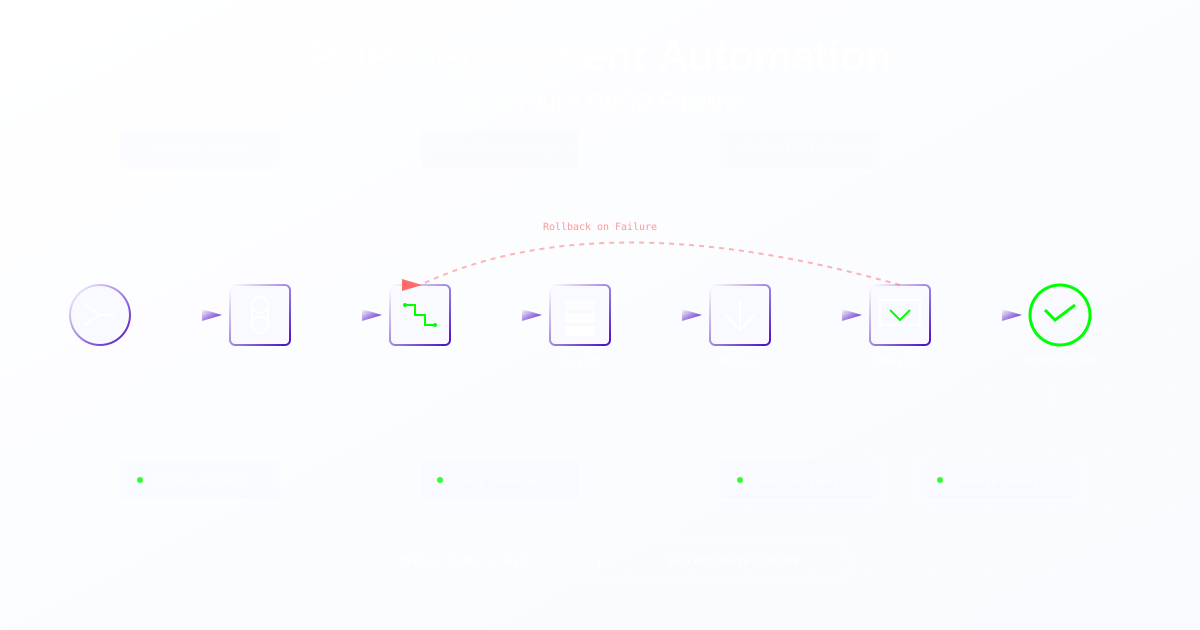
graph LR
    A[Git Push] --> B[Trigger Pipeline]
    B --> C[Code Quality Checks]
    C --> D[Security Scanning]
    D --> E[Unit Tests]
    E --> F[Integration Tests]
    F --> G[Build Docker Image]
    G --> H[Deploy to Staging]
    H --> I[Smoke Tests]
    I --> J[Deploy to Production]
    J --> K[Health Checks]
    K --> L[Monitoring]
Step 1: GitHub Actions - Complete PHP Pipeline
The Ultimate PHP Workflow
# .github/workflows/deploy.yml
name: PHP Deployment Pipeline

on:
  push:
    branches: [main, develop]
  pull_request:
    branches: [main]

env:
  PHP_VERSION: '8.3'
  NODE_VERSION: '18'

jobs:
  code-quality:
    runs-on: ubuntu-latest
    name: Code Quality Checks

    steps:
      - uses: actions/checkout@v3
        with:
          fetch-depth: 0  # Full history for better analysis

      - name: Setup PHP
        uses: shivammathur/setup-php@v2
        with:
          php-version: ${{ env.PHP_VERSION }}
          extensions: mbstring, xml, ctype, iconv, intl, pdo_mysql, dom, filter, gd, json, opcache, zip
          tools: cs2pr, phpstan, psalm, phpcs, phpcbf, phpmd
          coverage: xdebug

      - name: Cache Composer packages
        uses: actions/cache@v3
        with:
          path: vendor
          key: ${{ runner.os }}-php-${{ hashFiles('**/composer.lock') }}
          restore-keys: ${{ runner.os }}-php-

      - name: Install Dependencies
        run: |
          composer install --prefer-dist --no-progress --no-scripts --no-interaction
          composer dump-autoload --optimize

      - name: PHP Code Sniffer
        run: vendor/bin/phpcs --report=checkstyle src/ | cs2pr

      - name: PHPStan Analysis
        run: vendor/bin/phpstan analyse src/ --level=8 --error-format=github

      - name: Psalm Static Analysis
        run: vendor/bin/psalm --output-format=github

      - name: PHP Mess Detector
        run: vendor/bin/phpmd src/ github cleancode,codesize,controversial,design,naming,unusedcode

      - name: Check for Security Vulnerabilities
        run: |
          composer audit
          vendor/bin/security-checker security:check

  testing:
    runs-on: ubuntu-latest
    name: Testing Suite
    needs: code-quality

    services:
      mysql:
        image: mysql:8.0
        env:
          MYSQL_ROOT_PASSWORD: root
          MYSQL_DATABASE: test_db
        ports:
          - 3306:3306
        options: --health-cmd="mysqladmin ping" --health-interval=10s --health-timeout=5s --health-retries=3

      redis:
        image: redis:alpine
        ports:
          - 6379:6379
        options: --health-cmd="redis-cli ping" --health-interval=10s --health-timeout=5s --health-retries=3

    steps:
      - uses: actions/checkout@v3

      - name: Setup PHP
        uses: shivammathur/setup-php@v2
        with:
          php-version: ${{ env.PHP_VERSION }}
          extensions: mbstring, xml, ctype, iconv, intl, pdo_mysql, dom, filter, gd, json, opcache, zip, redis
          coverage: xdebug

      - name: Install Dependencies
        run: composer install --prefer-dist --no-progress

      - name: Setup Test Environment
        run: |
          cp .env.testing .env
          php artisan key:generate
          php artisan migrate --force
          php artisan db:seed --force

      - name: Run Unit Tests
        run: |
          vendor/bin/phpunit --testsuite=Unit --coverage-clover=coverage-unit.xml

      - name: Run Integration Tests
        run: |
          vendor/bin/phpunit --testsuite=Integration --coverage-clover=coverage-integration.xml

      - name: Run Feature Tests
        run: |
          vendor/bin/phpunit --testsuite=Feature --coverage-clover=coverage-feature.xml

      - name: Upload Coverage to Codecov
        uses: codecov/codecov-action@v3
        with:
          files: ./coverage-unit.xml,./coverage-integration.xml,./coverage-feature.xml
          fail_ci_if_error: true

      - name: Run Mutation Tests
        run: vendor/bin/infection --min-msi=80 --min-covered-msi=80

  build:
    runs-on: ubuntu-latest
    name: Build & Push Docker Image
    needs: testing
    if: github.ref == 'refs/heads/main'

    steps:
      - uses: actions/checkout@v3

      - name: Set up Docker Buildx
        uses: docker/setup-buildx-action@v2

      - name: Login to Docker Hub
        uses: docker/login-action@v2
        with:
          username: ${{ secrets.DOCKER_USERNAME }}
          password: ${{ secrets.DOCKER_PASSWORD }}

      - name: Build and Push Docker Image
        uses: docker/build-push-action@v4
        with:
          context: .
          push: true
          tags: |
            myapp/php:latest
            myapp/php:${{ github.sha }}
          cache-from: type=registry,ref=myapp/php:buildcache
          cache-to: type=registry,ref=myapp/php:buildcache,mode=max
          build-args: |
            PHP_VERSION=${{ env.PHP_VERSION }}
            BUILD_DATE=${{ github.event.head_commit.timestamp }}
            VCS_REF=${{ github.sha }}

  deploy-staging:
    runs-on: ubuntu-latest
    name: Deploy to Staging
    needs: build
    environment:
      name: staging
      url: https://staging.example.com

    steps:
      - uses: actions/checkout@v3

      - name: Deploy to Staging Server
        uses: appleboy/ssh-action@v0.1.5
        with:
          host: ${{ secrets.STAGING_HOST }}
          username: ${{ secrets.STAGING_USER }}
          key: ${{ secrets.STAGING_SSH_KEY }}
          script: |
            cd /var/www/staging
            docker pull myapp/php:${{ github.sha }}
            docker-compose down
            docker-compose up -d
            docker-compose exec app php artisan migrate --force
            docker-compose exec app php artisan cache:clear
            docker-compose exec app php artisan config:cache
            docker-compose exec app php artisan route:cache

      - name: Run Smoke Tests
        run: |
          sleep 30
          curl -f https://staging.example.com/health || exit 1
          npm run test:e2e:staging

  deploy-production:
    runs-on: ubuntu-latest
    name: Deploy to Production
    needs: deploy-staging
    environment:
      name: production
      url: https://example.com

    steps:
      - uses: actions/checkout@v3

      - name: Blue-Green Deployment
        uses: appleboy/ssh-action@v0.1.5
        with:
          host: ${{ secrets.PROD_HOST }}
          username: ${{ secrets.PROD_USER }}
          key: ${{ secrets.PROD_SSH_KEY }}
          script: |
            cd /var/www/production

            # Pull new image
            docker pull myapp/php:${{ github.sha }}

            # Start green environment
            docker-compose -f docker-compose.green.yml up -d

            # Wait for green to be healthy
            sleep 30
            curl -f http://localhost:8081/health || exit 1

            # Switch load balancer to green
            sudo nginx -s reload

            # Stop blue environment
            docker-compose -f docker-compose.blue.yml down

            # Update blue configuration for next deployment
            sed -i "s|image: .*|image: myapp/php:${{ github.sha }}|" docker-compose.blue.yml

      - name: Verify Production Deployment
        run: |
          curl -f https://example.com/health || exit 1
          npm run test:smoke:production

      - name: Notify Deployment Success
        uses: 8398a7/action-slack@v3
        with:
          status: success
          text: 'Production deployment successful! :rocket:'
          webhook_url: ${{ secrets.SLACK_WEBHOOK }}
Step 2: GitLab CI - Enterprise PHP Pipeline
# .gitlab-ci.yml
variables:
  DOCKER_DRIVER: overlay2
  DOCKER_TLS_CERTDIR: ""
  PHP_VERSION: "8.3"
  MYSQL_ROOT_PASSWORD: root
  MYSQL_DATABASE: test_db

stages:
  - quality
  - test
  - build
  - deploy
  - rollback

cache:
  key: "$CI_COMMIT_REF_SLUG"
  paths:
    - vendor/
    - node_modules/
    - .composer-cache/

before_script:
  - apt-get update -yqq
  - apt-get install -yqq git libzip-dev zip unzip
  - docker-php-ext-install zip pdo_mysql
  - pecl install redis && docker-php-ext-enable redis
  - composer install --prefer-dist --no-ansi --no-interaction --no-progress

code-quality:
  stage: quality
  image: php:${PHP_VERSION}
  script:
    - vendor/bin/phpcs src/
    - vendor/bin/phpstan analyse src/ --level=8
    - vendor/bin/psalm
    - vendor/bin/phpmd src/ text cleancode,codesize,controversial,design,naming,unusedcode
  artifacts:
    reports:
      codequality: gl-code-quality-report.json
  only:
    - merge_requests
    - main

security-scan:
  stage: quality
  image: php:${PHP_VERSION}
  script:
    - composer audit
    - vendor/bin/security-checker security:check
    - |
      docker run --rm -v "$PWD":/src \
        -e SONAR_HOST_URL="${SONAR_HOST_URL}" \
        -e SONAR_LOGIN="${SONAR_TOKEN}" \
        sonarsource/sonar-scanner-cli
  only:
    - main

unit-tests:
  stage: test
  image: php:${PHP_VERSION}
  services:
    - mysql:8.0
    - redis:alpine
  script:
    - cp .env.testing .env
    - php artisan migrate --force
    - vendor/bin/phpunit --testsuite=Unit --coverage-text --coverage-cobertura=coverage.xml
  coverage: '/^\s*Lines:\s*\d+.\d+\%/'
  artifacts:
    reports:
      coverage_report:
        coverage_format: cobertura
        path: coverage.xml

integration-tests:
  stage: test
  image: php:${PHP_VERSION}
  services:
    - mysql:8.0
    - redis:alpine
  script:
    - vendor/bin/phpunit --testsuite=Integration
  only:
    - main
    - develop

performance-tests:
  stage: test
  image: php:${PHP_VERSION}
  script:
    - apt-get install -yqq apache2-utils
    - php -S localhost:8000 -t public/ &
    - sleep 5
    - ab -n 1000 -c 100 http://localhost:8000/ | tee performance.txt
    - |
      if grep -q "Requests per second:.*[0-9]\{1,2\}\." performance.txt; then
        echo "Performance test failed: Less than 100 req/s"
        exit 1
      fi
  artifacts:
    paths:
      - performance.txt

build-docker:
  stage: build
  image: docker:latest
  services:
    - docker:dind
  script:
    - docker build -t $CI_REGISTRY_IMAGE:$CI_COMMIT_SHA .
    - docker tag $CI_REGISTRY_IMAGE:$CI_COMMIT_SHA $CI_REGISTRY_IMAGE:latest
    - docker login -u $CI_REGISTRY_USER -p $CI_REGISTRY_PASSWORD $CI_REGISTRY
    - docker push $CI_REGISTRY_IMAGE:$CI_COMMIT_SHA
    - docker push $CI_REGISTRY_IMAGE:latest
  only:
    - main

deploy-staging:
  stage: deploy
  image: alpine:latest
  before_script:
    - apk add --no-cache openssh-client
    - eval $(ssh-agent -s)
    - echo "$SSH_PRIVATE_KEY" | ssh-add -
  script:
    - |
      ssh -o StrictHostKeyChecking=no $STAGING_USER@$STAGING_HOST <<EOF
        cd /var/www/staging
        docker pull $CI_REGISTRY_IMAGE:$CI_COMMIT_SHA
        docker-compose down
        export IMAGE_TAG=$CI_COMMIT_SHA
        docker-compose up -d
        docker-compose exec -T app php artisan migrate --force
        docker-compose exec -T app php artisan cache:clear
      EOF
  environment:
    name: staging
    url: https://staging.example.com
  only:
    - main

deploy-production:
  stage: deploy
  image: alpine:latest
  before_script:
    - apk add --no-cache openssh-client curl
    - eval $(ssh-agent -s)
    - echo "$SSH_PRIVATE_KEY" | ssh-add -
  script:
    - |
      # Create deployment record
      DEPLOYMENT_ID=$(curl -X POST https://api.example.com/deployments \
        -H "Content-Type: application/json" \
        -d '{"version":"'$CI_COMMIT_SHA'","environment":"production"}' \
        | jq -r '.id')

      # Blue-Green Deployment
      ssh -o StrictHostKeyChecking=no $PROD_USER@$PROD_HOST <<EOF
        cd /var/www/production

        # Backup current state
        docker-compose -f docker-compose.blue.yml ps > /tmp/blue-state.txt

        # Deploy to green
        export IMAGE_TAG=$CI_COMMIT_SHA
        docker-compose -f docker-compose.green.yml pull
        docker-compose -f docker-compose.green.yml up -d

        # Health check
        for i in {1..30}; do
          if curl -f http://localhost:8081/health; then
            break
          fi
          sleep 2
        done

        # Switch traffic
        ln -sfn /etc/nginx/sites-available/green /etc/nginx/sites-enabled/active
        nginx -s reload

        # Stop blue
        docker-compose -f docker-compose.blue.yml down
      EOF

      # Update deployment status
      curl -X PATCH https://api.example.com/deployments/$DEPLOYMENT_ID \
        -H "Content-Type: application/json" \
        -d '{"status":"completed"}'
  environment:
    name: production
    url: https://example.com
  when: manual
  only:
    - main

rollback:
  stage: rollback
  image: alpine:latest
  script:
    - |
      ssh -o StrictHostKeyChecking=no $PROD_USER@$PROD_HOST <<EOF
        cd /var/www/production

        # Get previous version
        PREVIOUS_VERSION=$(docker images $CI_REGISTRY_IMAGE --format "{{.Tag}}" | head -2 | tail -1)

        # Deploy previous version
        export IMAGE_TAG=$PREVIOUS_VERSION
        docker-compose -f docker-compose.blue.yml up -d

        # Switch traffic back
        ln -sfn /etc/nginx/sites-available/blue /etc/nginx/sites-enabled/active
        nginx -s reload

        # Stop green
        docker-compose -f docker-compose.green.yml down
      EOF
  when: manual
  only:
    - main
Step 3: Advanced Deployment Strategies
Zero-Downtime Database Migrations
// database/migrations/SafeMigration.php
abstract class SafeMigration extends Migration
{
    protected $timeout = 900; // 15 minutes

    public function up()
    {
        // Set statement timeout
        DB::statement("SET statement_timeout = {$this->timeout}000");

        // Acquire advisory lock
        $lockId = crc32($this->getTableName());
        if (!DB::select("SELECT pg_try_advisory_lock($lockId)")[0]->pg_try_advisory_lock) {
            throw new Exception('Migration already running');
        }

        try {
            $this->safeUp();
        } finally {
            // Release lock
            DB::select("SELECT pg_advisory_unlock($lockId)");
        }
    }

    abstract protected function safeUp();
    abstract protected function getTableName(): string;
}

// Usage
class AddIndexToUsersTable extends SafeMigration
{
    protected function safeUp()
    {
        // Create index concurrently (non-blocking)
        DB::statement('CREATE INDEX CONCURRENTLY idx_users_email ON users(email)');
    }

    protected function getTableName(): string
    {
        return 'users';
    }
}
Feature Flag Deployment
// app/Services/FeatureFlag.php
class FeatureFlag
{
    private $redis;

    public function __construct(Redis $redis)
    {
        $this->redis = $redis;
    }

    public function isEnabled(string $feature, ?User $user = null): bool
    {
        // Check kill switch
        if ($this->redis->get("feature:kill:$feature")) {
            return false;
        }

        // Check global flag
        if ($this->redis->get("feature:global:$feature")) {
            return true;
        }

        // Check percentage rollout
        if ($percentage = $this->redis->get("feature:percentage:$feature")) {
            return $this->isInPercentage($user, $feature, (int)$percentage);
        }

        // Check user whitelist
        if ($user && $this->redis->sismember("feature:users:$feature", $user->id)) {
            return true;
        }

        return false;
    }

    private function isInPercentage(?User $user, string $feature, int $percentage): bool
    {
        if (!$user) return false;

        $hash = crc32($user->id . $feature);
        return ($hash % 100) < $percentage;
    }
}

// Deployment script
class FeatureDeployment
{
    public function gradualRollout(string $feature)
    {
        $redis = new Redis();

        // Start with 1% of users
        $redis->set("feature:percentage:$feature", 1);
        sleep(300); // Monitor for 5 minutes

        // Increase to 10%
        if ($this->metricsHealthy($feature)) {
            $redis->set("feature:percentage:$feature", 10);
            sleep(600); // Monitor for 10 minutes
        }

        // Increase to 50%
        if ($this->metricsHealthy($feature)) {
            $redis->set("feature:percentage:$feature", 50);
            sleep(1800); // Monitor for 30 minutes
        }

        // Full rollout
        if ($this->metricsHealthy($feature)) {
            $redis->set("feature:global:$feature", 1);
            $redis->del("feature:percentage:$feature");
        }
    }
}
Canary Deployments with Monitoring
# kubernetes/canary-deployment.yaml
apiVersion: flagger.app/v1beta1
kind: Canary
metadata:
  name: php-app
spec:
  targetRef:
    apiVersion: apps/v1
    kind: Deployment
    name: php-app
  service:
    port: 80
  analysis:
    interval: 1m
    threshold: 10
    maxWeight: 50
    stepWeight: 10
    metrics:
    - name: request-success-rate
      thresholdRange:
        min: 99
      interval: 1m
    - name: request-duration
      thresholdRange:
        max: 500
      interval: 1m
    webhooks:
    - name: load-test
      url: http://flagger-loadtester.test/
      timeout: 5s
      metadata:
        cmd: "hey -z 1m -q 10 -c 2 http://php-app.test/"
Step 4: Automated Testing Pipeline
Parallel Test Execution
# .github/workflows/parallel-tests.yml
test-matrix:
  strategy:
    matrix:
      testsuite: [Unit, Integration, Feature, Browser]
      shard: [1, 2, 3, 4]

  steps:
    - name: Run Tests in Parallel
      run: |
        vendor/bin/phpunit \
          --testsuite=${{ matrix.testsuite }} \
          --filter=shard:${{ matrix.shard }}:4 \
          --coverage-php=coverage-${{ matrix.testsuite }}-${{ matrix.shard }}.cov

    - name: Merge Coverage Reports
      if: matrix.shard == 4
      run: |
        vendor/bin/phpcov merge coverage/ --html=report/
Contract Testing
// tests/Contract/ApiContractTest.php
class ApiContractTest extends TestCase
{
    private $pact;

    protected function setUp(): void
    {
        parent::setUp();

        $this->pact = new Pact\Consumer\ConsumerBuilder('API-Consumer');
        $this->pact
            ->hasPactWith('API-Provider')
            ->uponReceiving('a request for user data')
            ->with([
                'method' => 'GET',
                'path' => '/api/users/1',
                'headers' => ['Accept' => 'application/json']
            ])
            ->willRespondWith([
                'status' => 200,
                'headers' => ['Content-Type' => 'application/json'],
                'body' => [
                    'id' => 1,
                    'name' => Pact\Matchers::like('John Doe'),
                    'email' => Pact\Matchers::email('john@example.com')
                ]
            ]);
    }

    public function testApiContract()
    {
        $client = new GuzzleHttp\Client(['base_uri' => $this->pact->getServer()]);
        $response = $client->get('/api/users/1');

        $this->assertEquals(200, $response->getStatusCode());
        $this->pact->verify();
    }
}
Step 5: Security Scanning Integration
SAST and DAST Pipeline
security-scan:
  stage: security
  parallel:
    matrix:
      - SCANNER: [semgrep, snyk, trivy, sonarqube]

  script:
    - |
      case $SCANNER in
        semgrep)
          docker run --rm -v "${PWD}:/src" \
            returntocorp/semgrep:latest \
            --config=auto --json -o semgrep-report.json
          ;;
        snyk)
          snyk test --all-projects --json > snyk-report.json
          snyk container test myapp/php:latest --json > snyk-container.json
          ;;
        trivy)
          trivy image --format json -o trivy-report.json myapp/php:latest
          ;;
        sonarqube)
          sonar-scanner \
            -Dsonar.projectKey=php-app \
            -Dsonar.sources=src \
            -Dsonar.host.url=$SONAR_HOST \
            -Dsonar.login=$SONAR_TOKEN
          ;;
      esac

  artifacts:
    reports:
      sast: "*-report.json"
Runtime Security Monitoring
// app/Middleware/SecurityMonitoring.php
class SecurityMonitoring
{
    private $alerts;

    public function handle($request, Closure $next)
    {
        // SQL Injection Detection
        $this->detectSQLInjection($request);

        // XSS Detection
        $this->detectXSS($request);

        // Rate Limiting
        $this->enforceRateLimit($request);

        // Log Security Events
        $this->logSecurityEvent($request);

        return $next($request);
    }

    private function detectSQLInjection($request)
    {
        $patterns = [
            '/(\bUNION\b.*\bSELECT\b)/i',
            '/(\bOR\b.*=.*)/i',
            '/(--|\#|\/\*)/i'
        ];

        foreach ($request->all() as $input) {
            foreach ($patterns as $pattern) {
                if (preg_match($pattern, $input)) {
                    $this->alert('SQL Injection Attempt', [
                        'ip' => $request->ip(),
                        'input' => $input,
                        'url' => $request->fullUrl()
                    ]);
                    abort(403);
                }
            }
        }
    }
}
Step 6: Monitoring and Observability
Comprehensive Monitoring Stack
# docker-compose.monitoring.yml
version: '3.8'

services:
  prometheus:
    image: prom/prometheus:latest
    volumes:
      - ./prometheus.yml:/etc/prometheus/prometheus.yml
      - prometheus_data:/prometheus
    command:
      - '--config.file=/etc/prometheus/prometheus.yml'
      - '--storage.tsdb.retention.time=30d'
    ports:
      - "9090:9090"

  grafana:
    image: grafana/grafana:latest
    volumes:
      - grafana_data:/var/lib/grafana
      - ./grafana/dashboards:/etc/grafana/provisioning/dashboards
    environment:
      - GF_SECURITY_ADMIN_PASSWORD=secret
    ports:
      - "3000:3000"

  jaeger:
    image: jaegertracing/all-in-one:latest
    environment:
      - COLLECTOR_ZIPKIN_HOST_PORT=:9411
    ports:
      - "5775:5775/udp"
      - "6831:6831/udp"
      - "6832:6832/udp"
      - "5778:5778"
      - "16686:16686"
      - "14250:14250"
      - "14268:14268"
      - "14269:14269"
      - "9411:9411"

  elasticsearch:
    image: elasticsearch:7.17.9
    environment:
      - discovery.type=single-node
      - "ES_JAVA_OPTS=-Xms512m -Xmx512m"
    volumes:
      - elasticsearch_data:/usr/share/elasticsearch/data
    ports:
      - "9200:9200"

  kibana:
    image: kibana:7.17.9
    environment:
      - ELASTICSEARCH_HOSTS=http://elasticsearch:9200
    ports:
      - "5601:5601"

volumes:
  prometheus_data:
  grafana_data:
  elasticsearch_data:
Application Metrics
// app/Services/MetricsCollector.php
class MetricsCollector
{
    private $prometheus;

    public function __construct()
    {
        $this->prometheus = new Prometheus\CollectorRegistry(
            new Prometheus\Storage\Redis()
        );
    }

    public function recordDeployment(string $version, string $environment)
    {
        $gauge = $this->prometheus->getOrRegisterGauge(
            'deployment',
            'info',
            'Deployment information',
            ['version', 'environment']
        );

        $gauge->set(1, [$version, $environment]);
    }

    public function recordRequestDuration(float $duration, string $route, int $statusCode)
    {
        $histogram = $this->prometheus->getOrRegisterHistogram(
            'http',
            'request_duration_seconds',
            'HTTP request duration',
            ['route', 'status'],
            [0.005, 0.01, 0.025, 0.05, 0.1, 0.25, 0.5, 1, 2.5, 5, 10]
        );

        $histogram->observe($duration, [$route, (string)$statusCode]);
    }

    public function recordDatabaseQuery(float $duration, string $query)
    {
        $histogram = $this->prometheus->getOrRegisterHistogram(
            'database',
            'query_duration_seconds',
            'Database query duration',
            ['query_type'],
            [0.001, 0.005, 0.01, 0.05, 0.1, 0.5, 1]
        );

        $queryType = $this->extractQueryType($query);
        $histogram->observe($duration, [$queryType]);
    }
}
Deployment Rollback Strategies
Automatic Rollback on Failure
#!/bin/bash
# rollback.sh

HEALTH_CHECK_URL="https://api.example.com/health"
MAX_RETRIES=5
RETRY_INTERVAL=10

# Function to check application health
check_health() {
    response=$(curl -s -o /dev/null -w "%{http_code}" $HEALTH_CHECK_URL)
    if [ $response -eq 200 ]; then
        return 0
    else
        return 1
    fi
}

# Deploy new version
echo "Deploying new version..."
docker-compose up -d --no-deps --build app

# Wait for application to start
sleep 30

# Health check loop
for i in $(seq 1 $MAX_RETRIES); do
    if check_health; then
        echo "Deployment successful!"

        # Tag as stable
        docker tag myapp/php:latest myapp/php:stable

        # Clean up old images
        docker image prune -f

        exit 0
    else
        echo "Health check failed (attempt $i/$MAX_RETRIES)"

        if [ $i -eq $MAX_RETRIES ]; then
            echo "Deployment failed! Rolling back..."

            # Rollback to previous version
            docker-compose down
            docker tag myapp/php:stable myapp/php:latest
            docker-compose up -d

            # Send alert
            curl -X POST $SLACK_WEBHOOK -d '{
                "text": "Deployment failed and rolled back!"
            }'

            exit 1
        fi

        sleep $RETRY_INTERVAL
    fi
done
Cost Optimization
Pipeline Resource Management
# Optimize CI/CD costs
optimization:
  cache:
    - vendor/
    - node_modules/
    - ~/.composer/cache
    - ~/.npm

  parallel:
    limit: 4  # Limit parallel jobs

  timeout: 30m  # Global timeout

  only:
    - main
    - develop
    - /^release\/.*$/

  except:
    - schedules
Setting Up CI/CD on Ubuntu Servers
Jenkins Setup on Ubuntu for PHP CI/CD
# Install Jenkins on Ubuntu 22.04
wget -q -O - https://pkg.jenkins.io/debian-stable/jenkins.io.key | sudo apt-key add -
sudo sh -c 'echo deb http://pkg.jenkins.io/debian-stable binary/ > /etc/apt/sources.list.d/jenkins.list'
sudo apt update
sudo apt install -y jenkins openjdk-11-jdk

# Install PHP and tools
sudo apt install -y php8.3 php8.3-cli php8.3-xml php8.3-mbstring \
    php8.3-curl php8.3-zip composer phpunit

# Start Jenkins
sudo systemctl start jenkins
sudo systemctl enable jenkins

# Get initial admin password
sudo cat /var/lib/jenkins/secrets/initialAdminPassword
GitLab Runner on Ubuntu
# Install GitLab Runner on Ubuntu
curl -L "https://packages.gitlab.com/install/repositories/runner/gitlab-runner/script.deb.sh" | sudo bash
sudo apt install gitlab-runner

# Register runner
sudo gitlab-runner register \
    --non-interactive \
    --url "https://gitlab.com/" \
    --registration-token "YOUR_TOKEN" \
    --executor "shell" \
    --description "ubuntu-php-runner" \
    --tag-list "php,ubuntu" \
    --run-untagged="true" \
    --locked="false"

# Install PHP dependencies for runner
sudo -u gitlab-runner composer global require phpunit/phpunit phpstan/phpstan squizlabs/php_codesniffer
Automated Deployment Script for Ubuntu Servers
#!/bin/bash
# /home/deploy/php-deploy.sh

set -e

# Configuration
APP_DIR="/var/www/php-app"
BACKUP_DIR="/var/backups/php-app"
DEPLOY_USER="deploy"
WEB_USER="www-data"

# Colors for output
RED='\033[0;31m'
GREEN='\033[0;32m'
NC='\033[0m'

echo -e "${GREEN}Starting PHP deployment on Ubuntu...${NC}"

# Create backup
TIMESTAMP=$(date +%Y%m%d_%H%M%S)
sudo -u $WEB_USER tar -czf "$BACKUP_DIR/backup_$TIMESTAMP.tar.gz" -C "$APP_DIR" .
echo -e "${GREEN}Backup created: backup_$TIMESTAMP.tar.gz${NC}"

# Pull latest code
cd $APP_DIR
sudo -u $DEPLOY_USER git fetch origin main
sudo -u $DEPLOY_USER git reset --hard origin/main

# Install dependencies
sudo -u $DEPLOY_USER composer install --no-dev --optimize-autoloader

# Run database migrations
sudo -u $DEPLOY_USER php artisan migrate --force

# Clear caches
sudo -u $DEPLOY_USER php artisan cache:clear
sudo -u $DEPLOY_USER php artisan config:cache
sudo -u $DEPLOY_USER php artisan route:cache
sudo -u $DEPLOY_USER php artisan view:cache

# Set permissions
sudo chown -R $WEB_USER:$WEB_USER storage bootstrap/cache
sudo chmod -R 775 storage bootstrap/cache

# Restart PHP-FPM
sudo systemctl reload php8.3-fpm

# Health check
sleep 5
if curl -f http://localhost/health > /dev/null 2>&1; then
    echo -e "${GREEN}Deployment successful!${NC}"
else
    echo -e "${RED}Health check failed! Rolling back...${NC}"
    # Restore from backup
    sudo -u $WEB_USER tar -xzf "$BACKUP_DIR/backup_$TIMESTAMP.tar.gz" -C "$APP_DIR"
    sudo systemctl reload php8.3-fpm
    exit 1
fi
Setting Up GitHub Actions Runner on Ubuntu
# Create actions runner user
sudo useradd -m -s /bin/bash actions-runner
sudo usermod -aG sudo actions-runner

# Download and configure runner
cd /home/actions-runner
curl -o actions-runner-linux-x64-2.311.0.tar.gz -L https://github.com/actions/runner/releases/download/v2.311.0/actions-runner-linux-x64-2.311.0.tar.gz
tar xzf actions-runner-linux-x64-2.311.0.tar.gz

# Configure runner
./config.sh --url https://github.com/YOUR_ORG/YOUR_REPO \
    --token YOUR_RUNNER_TOKEN \
    --name ubuntu-runner \
    --work _work \
    --labels ubuntu,php

# Install as service
sudo ./svc.sh install
sudo ./svc.sh start

# Install PHP and dependencies
sudo apt install -y php8.3-cli php8.3-mbstring php8.3-xml composer
Ansible Playbook for PHP Deployment on Ubuntu
# deploy-php-ubuntu.yml
---
- name: Deploy PHP Application to Ubuntu Servers
  hosts: webservers
  become: yes
  vars:
    app_dir: /var/www/php-app
    deploy_user: deploy

  tasks:
    - name: Update apt cache
      apt:
        update_cache: yes
        cache_valid_time: 3600

    - name: Install PHP and extensions
      apt:
        name:
          - php8.3-fpm
          - php8.3-cli
          - php8.3-mysql
          - php8.3-redis
          - php8.3-mbstring
          - php8.3-xml
          - php8.3-curl
          - nginx
          - git
          - composer
        state: present

    - name: Clone/update repository
      git:
        repo: 'git@github.com:company/php-app.git'
        dest: "{{ app_dir }}"
        version: main
        accept_hostkey: yes
      become_user: "{{ deploy_user }}"

    - name: Install composer dependencies
      composer:
        command: install
        working_dir: "{{ app_dir }}"
        no_dev: yes
        optimize_autoloader: yes
      become_user: "{{ deploy_user }}"

    - name: Run migrations
      command: php artisan migrate --force
      args:
        chdir: "{{ app_dir }}"
      become_user: "{{ deploy_user }}"

    - name: Set permissions
      file:
        path: "{{ app_dir }}/{{ item }}"
        owner: www-data
        group: www-data
        mode: '0775'
        recurse: yes
      loop:
        - storage
        - bootstrap/cache

    - name: Restart PHP-FPM
      systemd:
        name: php8.3-fpm
        state: reloaded

    - name: Restart Nginx
      systemd:
        name: nginx
        state: reloaded
Monitoring Your Ubuntu PHP Deployment
Setting Up Monitoring Stack
# Install Prometheus Node Exporter on each Ubuntu server
wget https://github.com/prometheus/node_exporter/releases/download/v1.7.0/node_exporter-1.7.0.linux-amd64.tar.gz
tar xvf node_exporter-1.7.0.linux-amd64.tar.gz
sudo cp node_exporter-1.7.0.linux-amd64/node_exporter /usr/local/bin/
sudo useradd -rs /bin/false node_exporter

# Create systemd service
sudo tee /etc/systemd/system/node_exporter.service > /dev/null <<EOF
[Unit]
Description=Node Exporter
After=network.target

[Service]
User=node_exporter
Group=node_exporter
Type=simple
ExecStart=/usr/local/bin/node_exporter

[Install]
WantedBy=multi-user.target
EOF

sudo systemctl daemon-reload
sudo systemctl start node_exporter
sudo systemctl enable node_exporter
Conclusion
Building a robust PHP CI/CD pipeline on Ubuntu servers provides complete control over your deployment process. By combining GitHub Actions or GitLab CI with proper server configuration, automated testing, and deployment scripts, you can achieve enterprise-grade deployment automation.
This guide has covered everything from setting up CI/CD tools on Ubuntu to implementing zero-downtime deployments and monitoring. With these configurations, your PHP applications will deploy reliably and automatically while maintaining high security and performance standards.
Remember: automation is an investment that pays dividends. Every manual deployment avoided is time saved and errors prevented. Start with basic automation and gradually add sophistication as your needs grow.